Article Overview
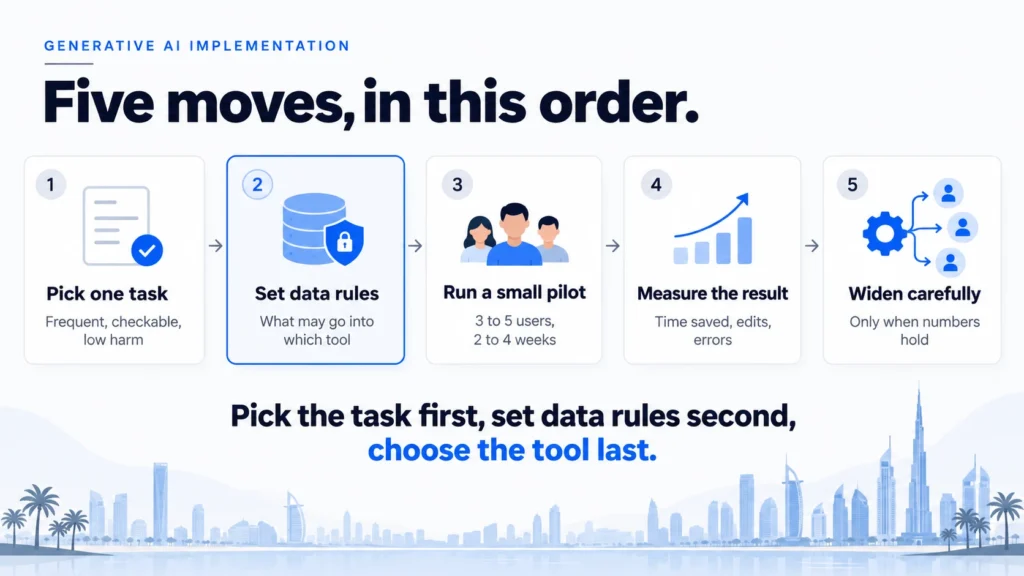
Generative AI implementation is the work of getting a tool like ChatGPT or Copilot to do one real job reliably in your business, with rules for your data and a person checking the output. It works when you pick the task first, set data rules second and choose the tool last.
Most owners do it the other way round. They buy licences, tell staff to try them, and wait. Our AI Transformation work starts from the business problem instead, and this guide shows the five moves we use for generative AI implementation.
Ready to put generative AI to work?
Skip ahead to our AI transformation services for UAE businesses.
- Generative AI implementation has five moves: pick one task, set data rules, run a small pilot, measure the result and then widen. Skipping the first two is the most common reason projects stall.
- Start with a task that is frequent, text-based, easy to check and low in harm if the answer is wrong. Drafting replies and summarising calls fit. Approving payments does not.
- Write data rules before generative AI implementation begins. Decide what may be pasted into which tool, who reviews anything sent outside the company, and who owns the result after launch.
- Measure time saved, edits made to the output and errors caught in review. Widen to more people or more tasks only when those numbers hold for a few weeks in a row.
What does generative AI implementation involve?
Generative AI implementation means setting up a tool that produces text, images, summaries or code so that it does a defined job in your business, with rules, an owner and a way to check results. It is more than giving staff a login. It is a small change to how one piece of work gets done.
Adoption is already widespread. Stanford’s 2025 AI Index reports that 78% of organisations used AI in 2024, up from 55% the year before. Using a tool is not the same as implementing it. Using means individuals try it when they feel like it. A generative AI implementation means the business decides which job it does, how well it must do it and who is accountable.
Think of generative AI as a very fast new employee who has read a huge amount but knows nothing about your company. They write quickly, they never get tired, and they sometimes state wrong things with complete confidence. You would not let that person email your clients on day one. You would give them one task, show them what good looks like, and check their work at first.
That is the pattern behind most successful generative AI implementation:
- Pick one task: a job that repeats and can be checked.
- Set data rules: what the tool may see and who reviews output.
- Run a small pilot: a few people, a few weeks, always reviewed.
- Measure the result: time saved, edits made, errors caught.
- Widen carefully: add people or tasks only when the numbers hold.
Latent Digital Solutions treats generative AI implementation as a business change first and a technology choice second.
Which task should you start with?
Start with a task that happens often, involves text, can be checked quickly by a person and does little harm if the AI gets it wrong. Good first tasks are drafting replies, summarising calls and searching your own documents. Poor first tasks are anything that moves money or makes a legal commitment.
Four questions help you choose:
- Is it frequent? A weekly job saves little. A daily job saves hours.
- Is it mostly text? Generative AI is strongest at reading, writing and summarising.
- Can a person check it in a minute? Fast checking keeps the risk low.
- Is a wrong answer cheap? An odd email draft costs nothing. A wrong payment does.
| Task | Good first choice? | Reason |
|---|---|---|
| Drafting replies to customer queries | Yes, with review | Frequent, text-based, a person sends it |
| Summarising calls and meetings | Yes | Easy to check, low harm |
| Searching internal documents | Yes, if sources are shown | Answers can be traced to a file |
| Writing contract clauses | No | A wrong clause carries legal risk |
| Approving payments or refunds | No | Errors cost money immediately |
Many first projects fail here. A team picks an impressive-sounding task, such as an assistant for the whole company, and nobody can say afterwards whether it worked. A good generative AI implementation starts narrow. A narrow task gives you a clear before-and-after, a small group to train and a short list of risks to manage. Resist the urge to list ten tasks. Rank them on the four questions above and take the top one.
Pick one task and write it as a sentence with a number. For example, “reduce the time to draft a reply to tenant maintenance requests from twelve minutes to four”. If you cannot write that sentence, the task is not ready, and a longer list of ideas will not fix it. Choose the task before you compare tools for generative AI implementation.
Our guide to generative AI for business lists where the technology helps and where it does not, which is a useful companion when you are choosing between candidate tasks.
What data rules do you need before staff start?
You need a short written rule covering what may be pasted into which tool, who reviews anything sent outside the company, and who is accountable for results. Write it before staff start, because habits form in the first week. Two pages is enough, and a page of clear rules beats a long policy that nobody reads.
The UAE government treats this seriously. Its AI office published a generative AI guide in April 2023 covering 100 use cases, and it emphasises data privacy. If government teams are told to think about data first, a private business should too.
Sort your information into four groups, then say which tools each group may enter:
- Public: published prices, marketing copy. Any approved tool is fine.
- Internal: procedures, internal reports. Only approved business-grade tools.
- Confidential: client contracts, financial results. Only tools where the provider’s terms say your data is not used to train its models.
- Personal: customer or staff details. Allowed only where the UAE personal data protection law (Federal Decree-Law No. 45 of 2021) is met, with a contract in place.
A clear rule is the cheapest protection a generative AI implementation can have. Review it every quarter, because tools change their terms, staff change roles and new uses appear.
Add three more lines to the rule. Name the approved tools. State that anything sent to a client is read by a person first. Name one owner who answers questions and updates the rule.
Free consumer chat apps deserve a specific mention. Staff often use them out of habit because they are quick. Say plainly whether company information may enter them. Most businesses decide no, and provide an approved alternative so people are not tempted.
Our guide to generative AI risk management goes deeper on the policy side, including what to log and how to handle a mistake when one happens.
How do you run a first generative AI implementation?
Run a first generative AI implementation as a small pilot: one task, an owner, three to five users, two to four weeks, and a person reviewing every output. The aim is to learn what good looks like on your own work, not to roll out to everyone.
A pilot follows these steps:
- Name the owner and the task: one person is accountable for the result.
- Write the instructions: tell the tool the job, the tone, what to include and what to avoid.
- Collect 20 to 30 real examples: include easy cases and awkward ones, with the right answer written down.
- Run it with a few people: they use the tool for real work and note every edit they make.
- Review weekly: compare the output with what staff would have written and adjust the instructions.
Treat the first week as setup, not a test of the tool. Staff need time to learn how to ask for what they want, and the instructions will change several times. Keep each version of the instructions so you can see what improved the results.
Illustrative example (not a client case): a Dubai property management company handles about 40 tenant maintenance requests a week. A coordinator spends around twelve minutes drafting each reply. The pilot uses the tool to draft the reply from the request and the unit record. The coordinator edits and sends it. The coordinator also notes which requests the draft handled badly, such as complaints with several issues, so those can be routed to a person. After three weeks, the company compares time per reply and how many edits were needed. If the drafts are mostly usable, it extends its first generative AI implementation to a second coordinator.
This is the approach behind our work on starting with one task and one measurable result. One task, a clear measure and a short feedback loop make the next decision easy.
Keep a log during the pilot. Note each wrong or odd answer and why it happened. After two weeks the pattern is usually clear. Missing context, vague instructions and unusual cases cause most of the errors, and each has a fix.
Test in both Arabic and English if your customers use both. Quality differs by tool, dialect and document type, so check it on your own examples before you widen.
How do you measure generative AI implementation?
Measure generative AI implementation with four numbers: time saved per task, the share of outputs staff had to rewrite, errors caught in review and how many people still use the tool after a month. Together they show whether the change is real or just a novelty.
| Measure | How to track it | Healthy sign |
|---|---|---|
| Time per task | Time ten tasks before, ten after | Clear drop that holds for weeks |
| Edits needed | Staff mark each output as usable, light edit or rewrite | Most outputs usable or lightly edited |
| Errors caught | Count issues found in review | Falling over time |
| Active users | Weekly count of people using it | Steady or rising after a month |
A generative AI implementation that saves time but doubles errors is not a success. Compare against the old way of working, not against perfection. A draft that needs one edit and saves eight minutes is a win, even if it is not flawless.
Watch the rewrite rate most closely. If staff rewrite most outputs, the tool is adding steps instead of removing them. Fix the instructions, or the task, before adding people. If usage falls after the first fortnight, ask staff why, because the reason is often a small annoyance that is easy to fix.
When the numbers hold for a few weeks, widen in a controlled way: add a second team on the same task, or add a second task for the same team. Do not do both at once. Each change needs its own measurement, or you cannot tell what caused a result. Record what you learned and update the data rule if anything changed.
Should you build, buy or configure?
Most businesses should configure first: use a ready-made tool and shape it with your instructions, documents and rules. Buy a specialist product when the task is common and well served. Build custom software only when your process is unusual enough that neither option works.
The three options sit on a scale:
- Use as it is: the plain tool with staff prompts. Fastest, with the least control.
- Configure: the same tool connected to your documents, with fixed instructions, templates and review steps. This is where most value sits.
- Build: custom software that connects generative AI to your systems. It costs more and needs maintenance, so use it when the process really is yours alone.
Configuring covers more than people expect. A shared set of instructions, a folder of approved documents and a review step can turn a general tool into a reliable team resource, with little or no software to write.
Whichever option you choose, keep the instructions, examples and documents in your own files, not only inside one vendor’s tool. That keeps generative AI implementation portable if prices, terms or quality change.
A proof of concept is the cheapest way to find out which option you need. Our guide to an AI proof of concept explains how to run one and how to tell whether you need it at all. It is worth doing before any larger commitment, because it costs little and shows you the real effort involved.
Do not choose the tool first in a generative AI implementation. Fix the task, the data rules and the measure, then compare two or three tools against your own 20 to 30 examples. The tool that handles your documents best, including Arabic, wins, whatever the brand. Also ask each supplier where your data is stored, how long it is kept and whether it is used to train their models, and get the answers in writing before you sign anything.
What does generative AI implementation cost?
The cost of generative AI implementation depends mostly on how many people use the tool and how much setup it needs. Licences or usage fees are the visible part. Staff time for setup, training and review is the hidden part, and it is usually larger at the start.
The main cost lines are:
- Licences or usage fees: a monthly price per user, or a charge per request.
- Setup: writing instructions, connecting documents and testing on real examples.
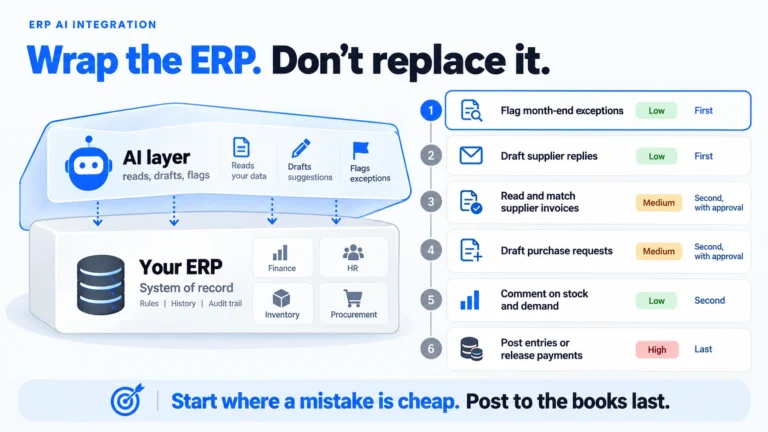
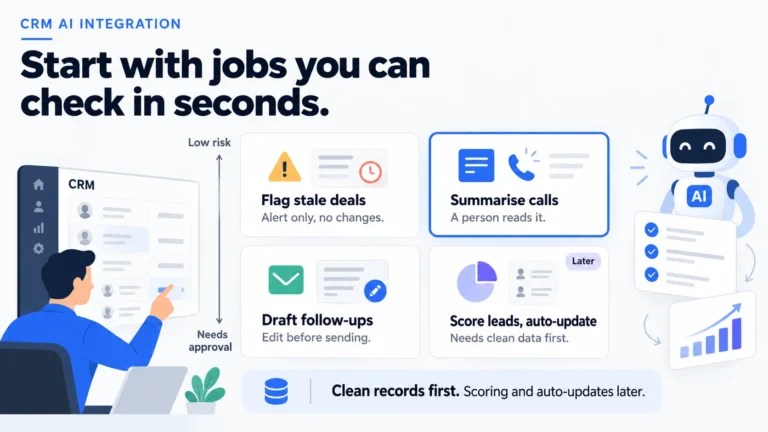
- Integration: linking the tool to your ERP, CRM or shared folders, if you need that.
- Training and time: staff hours to learn the new routine and review output.
- Ongoing review: a few hours a month for checks, updates and complaints.
Two traps are common. The first is paying for licences for everyone before the pilot has shown who benefits. The second is ignoring review time, which turns a cheap tool into an expensive habit. Count both from the start.
Ask any supplier for a monthly figure in AED, with VAT shown, and for the first-year total. Compare quotes on cost per task rather than total price. A tool that staff stop using is expensive at any price.
Our guide to AI implementation cost gives typical dirham ranges for UAE projects and the line items that quotes tend to leave out.
Keep the first phase of generative AI implementation small, so the maximum you can lose is also small. A pilot priced as a few weeks of effort tells you more per dirham than a large programme you cannot judge for six months.
As a frame, a fixed, scoped first project, such as one use case with a review step, typically runs AED 9,000–37,000 in UAE advisory pricing, before 5% VAT (see our small-business AI consultant guide). Connecting a generative AI tool to one of your systems is closer to AED 30,000–80,000 for a single workflow (see our AI integration services guide). Subscription fees for the tools themselves are separate, so ask each supplier for a monthly figure in AED with VAT shown.
What goes wrong in generative AI implementation?
Generative AI implementation usually goes wrong for ordinary reasons: staff paste confidential data into the wrong tool, nobody owns the result, wrong answers are trusted without checking, and the rollout reaches everyone before the pilot has proved anything. Each of these is preventable.
- No data rule: staff use whatever tool is handy. Fix: the two-page rule and an approved tool list.
- No owner: the tool is everyone’s and no one’s. Fix: name one person accountable.
- Blind trust: fluent text is mistaken for correct text. Fix: a person reviews anything that leaves the company.
- Rollout too fast: twenty people start before the instructions are tested. Fix: pilot first.
- Untested Arabic: quality drops on dialect or scanned documents. Fix: test on your own examples.
- No follow-up: use fades after a month. Fix: review the active-user count monthly.
The technology usually works well enough. The missing piece is a decision someone should have made earlier. That is why generative AI implementation puts the task and the rules ahead of the tool.
If a mistake does happen, treat it as information. Record what went wrong, fix the instruction or the rule, and tell staff what changed. Teams that talk about early errors openly tend to build trust in the tool faster.
Conclusion
Generative AI implementation is a sequence of small decisions: one task, clear data rules, a short pilot, honest measurement and careful widening. The tool matters less than those decisions, and most disappointing projects skip the first two. Start with a job that is frequent, text-based and easy to check. Write the rules before staff start. Review everything that leaves the company, and keep the numbers that show whether it works.
In the next 30 days, you can write the one-sentence task with a number, draft the two-page data rule and run a three-person pilot on 20 real examples. Those weeks of generative AI implementation will tell you more than any vendor demo.
If a specific task is on your mind, talk to Latent’s team about whether it is ready for generative AI implementation.
Frequently Asked Questions
How do you implement generative AI in a business?
Follow five moves: pick one frequent, checkable task, set data rules, run a small reviewed pilot, measure the result and widen only when the numbers hold. Start with the task, not the tool.
What are the steps in generative AI implementation?
Name an owner, write instructions for the tool, collect 20 to 30 real examples, run the pilot with a few people and review weekly. Measure time saved, edits needed and errors caught before adding more users.
How long does generative AI implementation take?
A first generative AI implementation pilot usually takes two to four weeks once the task and data rules are agreed. Wider rollout depends on how many teams and systems are involved. Plan on months, not days, for anything beyond a single team.
How much does generative AI implementation cost?
The cost of generative AI implementation depends on the number of users, the setup and any connection to your systems. Licences are the visible part, and staff time for setup and review is the hidden part. Ask for a monthly figure in AED and a first-year total.
Can staff use ChatGPT with company data?
Only if your data rule allows it. Many businesses keep confidential and personal data out of free consumer tools and provide an approved business-grade alternative instead. Write the rule before staff start and name the approved tools.
Do you need to train your own model?
Almost never. Most businesses configure an existing tool with their own instructions and documents. Training a model is expensive and rarely needed for tasks like drafting, summarising and searching documents.
Usually a reply within one working day.