Article Overview
CRM AI integration means adding AI to the customer system you already pay for. It can summarise calls, draft follow-ups and flag stale deals without a move to a new CRM. Most businesses get further by tidying the CRM they have than by buying an “AI CRM” with the same weak data inside.
Our AI Transformation work starts with the sales and service tasks that eat your team’s week. This guide sets out which of those tasks suit AI first, how the connection works, and where it tends to fail.
Running a CRM and ready for AI?
Skip ahead to our AI transformation services for UAE businesses.
- CRM AI integration usually means adding AI to the CRM you own, not replacing it. Your records, pipeline and history stay put, and the AI drafts, summarises and flags on top of them.
- Start CRM AI integration with jobs where a salesperson can check the result in seconds: call summaries, follow-up drafts and stale-deal alerts. Keep lead scoring and automatic record changes for later, once the data is trusted.
- Data quality decides the result. A 2026 survey found B2B sales teams think roughly a third of their CRM records are inaccurate, incomplete or outdated. AI will repeat those mistakes confidently.
- UAE data law is consent-first, so decide what customer information the AI may see, and agree a contract with any outside tool that handles it, before the pilot starts and before live data is shared.
What does CRM AI integration actually do?
CRM AI integration lets an AI tool read the customer records in your CRM and help with the writing, summarising and sorting that your team does by hand. It does not close deals. It saves the typing, searching and remembering around the deal.
In a normal week, a salesperson logs calls, writes follow-up emails, updates deal stages and hunts for what was promised to a client last quarter. Most of that work is reading and writing. AI is good at both, as long as the information it reads is right.
The help comes in three sizes:
- Summarise: turn a call note or email thread into three lines on what was agreed and what happens next.
- Draft: write a follow-up email, a quote cover note or a reply to a customer question, ready for a person to edit.
- Flag: point out deals with no activity for weeks, customers who have gone quiet, or records that look duplicated.
None of these CRM AI integration jobs changes your pipeline on its own. A person reads the output and decides. That is why they make good first jobs for CRM AI integration.
Latent Digital Solutions sees CRM AI integration as a way to give your people their time back. It only works when they trust what the tool tells them.
Do you have to switch CRM for CRM AI integration?
Usually not. For CRM AI integration, most current CRMs already include AI features or connect to outside tools, and your records are the valuable part. Switching to an “AI CRM” moves the same records into a new screen and often brings the same data problems along with them.
Many vendor pages answer the question with the same advice: move to ours, and the new AI will sort it out. That advice suits the vendor, because every sale of a switch is a sale of a licence. Your situation is different if you already have years of customer history, trained staff and reports built on the current system.
Switching also carries a bill that vendor comparison pages rarely mention. Records must be mapped field by field, reports rebuilt, other tools reconnected and people retrained. For a while, two systems run side by side. For a sales team of ten to thirty, that is weeks of lost momentum before any AI benefit arrives. Ask what you would gain that a feature switch on your current CRM cannot give you. If the answer is a specific capability, test it as a connector first. If the answer is simply “AI”, start with the native feature.
Changing CRM is worth considering in a few cases:
- The supplier no longer supports your version.
- There is no way to export data or connect another tool.
- Your records are so scattered across spreadsheets and inboxes that the CRM was never really used.
If none of these applies, add AI to what you have. Start with a narrow job and judge the result before spending on anything larger. To test a small tool on real work before you commit, see the best AI agents for small business for a simple way to run the trial.
A middle path exists. Some CRM vendors let you switch on their AI features for one team and one job, which costs little to test. Treat that as a trial like any other, with a clear measure.
What can CRM AI integration safely handle?
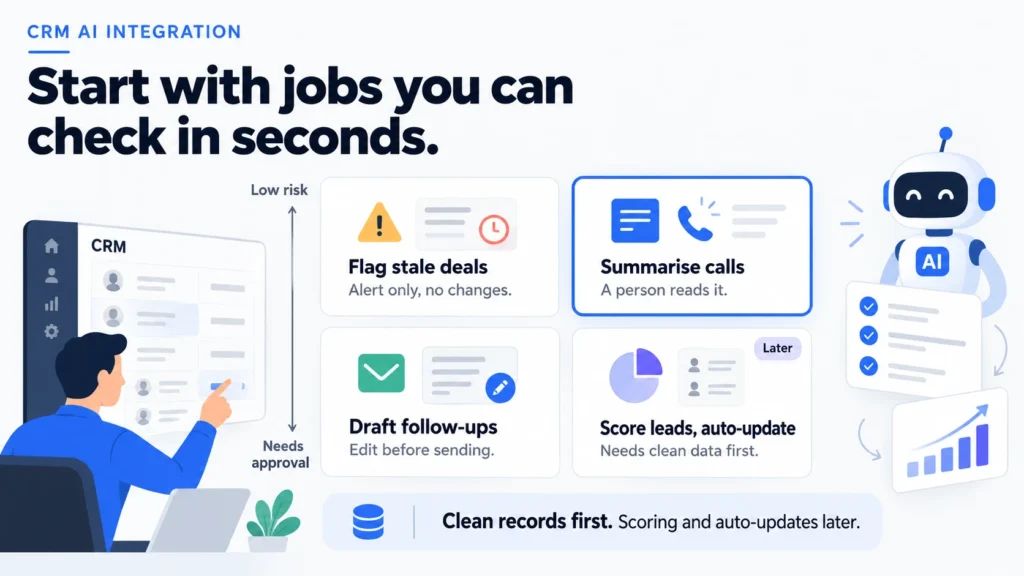
CRM AI integration can safely take on jobs where a person can check the output in seconds and a mistake does little harm. Call summaries, follow-up drafts and stale-deal alerts fit. Jobs that change records on their own, or score leads, need clean data and a longer record first.
| Job | Needs approval | Effort to start |
|---|---|---|
| Summarise a call or email thread | No, a person reads it | Low |
| Draft a follow-up email | Yes, before sending | Low |
| Flag deals with no recent activity | No, it is an alert | Low |
| Suggest the next step on a deal | Yes | Medium |
| Update fields or score leads automatically | Yes, and review often | High |
Start CRM AI integration at the top of the table. Summaries and alerts change nothing in the CRM, so they carry almost no risk. They also show your team quickly whether the tool understands your business.
Follow-up drafts come next. A good draft saves several minutes per email, and because a salesperson edits and sends it, the customer never sees a raw machine answer. Count how often drafts are used as written, with light edits or rewritten. That count is the best early measure of usefulness.
A useful test for any job is whether a new employee could check the result on their first day. If yes, it is a sensible place to start. If checking needs years of context, wait.
Lead scoring and automatic updates sit at the bottom of CRM AI integration for a reason. They depend on the CRM data being right and consistent, and a wrong score quietly sends a salesperson to the wrong customer. Earn those jobs with evidence from the easier ones.
Native feature, connector or custom build?
In CRM AI integration, a native feature is the AI your CRM supplier built into the product. A connector links an outside AI tool to the CRM using the supplier’s interface. A custom build is software written to join your CRM, your documents and the AI around your own process.
| Route | Good for | Watch for |
|---|---|---|
| Native feature | A first trial on one team | Limited to what the vendor offers |
| Connector | Using a better tool with your CRM | Access limits and extra fees |
| Custom build | Unusual sales processes | Cost and ongoing upkeep |
Most businesses should begin with the native feature, because it is quick to switch on and supported by the supplier. Move to a connector when the native feature is too basic for the job. Consider a custom build only when your sales process is unusual and neither option fits.
Whichever route you take for CRM AI integration, restrict what the AI can see. A sales assistant does not need staff records or supplier contracts. Give it the customer fields and notes that the task needs and keep a log of what it reads and writes.
We often see teams choose a tool first and discover its limits later. Reverse that order. Decide the job, the data it needs and the approval step, then compare tools on those terms. If you want help comparing suppliers for the connection, AI integration services sets out what a fair scope includes.
Where does CRM data let AI down?
CRM AI integration fails first on data: duplicates, gaps, stale records and wrong ownership. The AI cannot tell which of three entries for the same customer is right. It uses all of them and sounds sure about every one. Tidy the fields the job uses before you connect anything, because clean records are the cheapest improvement available.
The scale of the problem is large. Firmable, a B2B data provider, surveyed 222 B2B sales professionals in September 2026. Teams believe roughly a third of the contact and account records in their CRM are inaccurate, incomplete or outdated. A companion survey of 220 respondents found that 80% lose at least 10% of their selling time to finding, cleaning or updating data. These are surveys of B2B sales teams, not UAE businesses specifically, but the pattern is familiar.
Four problems appear again and again:
- Duplicates: two records for one customer, with different owners and different histories. The AI draws on both.
- Gaps: missing contact details, empty deal stages or notes that say only “called”. There is little for the AI to summarise.
- Stale records: contacts who left the company a year ago still receive drafted emails.
- Wrong routing: a deal owned by someone who has left means an alert goes to nobody.
Fix these with a short clean-up before the pilot of any CRM AI integration. Pick the fields the job will use, open fifty records and count the problems. A day spent here usually saves weeks of confusion later.
Sales teams also need a reason to trust the tool. If the first drafts are poor, reps stop using it by the second week. Choose a job where good drafts are easy to produce, ask the team to mark each one as useful or not, and share the results. For help bringing a team along, see AI tools for change management, which suits businesses without a change specialist.
What does UAE data law mean for CRM AI integration?
UAE data law is consent-first. A CRM AI integration should only use customer information you are allowed to process, and any outside AI tool that handles it needs a proper contract. Decide what the AI may see, and get the contract in place, before the pilot starts.
Your CRM is full of personal data: names, phone numbers, emails and notes about conversations. Writing in the Solicitors Journal, UAE lawyer Ashish Mehta explains that, under the federal data protection law, personal data cannot be processed without the consent of the data subject. He adds that a controller sharing data with a third party for processing must have firmly drafted contracts in place with that party.
For a CRM AI integration, that suggests four practical steps:
- Check your consent basis: confirm that your customers agreed to the kind of use you plan, such as service follow-ups.
- Limit the fields: give the AI only the fields the job needs, and leave out sensitive notes.
- Get the contract: agree in writing where the AI provider keeps data, who can access it and whether it trains its models on your records.
- Keep a log: record what the AI read and produced, so you can answer a customer or regulator.
This is guidance for planning, not legal advice. Ask your lawyer to review the contract with any AI provider before you share live customer data.
How do you trial CRM AI integration in two weeks?
Run a two-week trial on one team and one job, with a person checking every output and a count of how many were useful. The goal is evidence about your own data, not a showcase for the tool.
- Choose the job and a number: for example, the minutes spent writing each follow-up after a client call.
- Pick the team: three to five people who do the job often and will give honest feedback.
- Clean the fields: tidy the records the job will use, and restrict the AI’s access to them.
- Run it for real work: staff use the drafts on live tasks and mark each as used as written, edited or rewritten.
- Review at the end: compare the time per task with the old way and look at the rewrite rate.
Illustrative example (not a client case): a Dubai recruitment agency has six consultants who each write a follow-up email to a client after every call. Notes sit in the CRM, and each email takes about ten minutes. In the trial, the AI drafts the email from the call notes and the consultant edits it. After two weeks, the agency compares minutes per email and how many drafts were usable. If most drafts are good, it extends the same setup to candidate updates.
This one-team, one-job format is how our work on adding AI to your CRM without replacing it usually begins. Each trial of CRM AI integration ends with a number the owner can act on.
Write down three things during the trial. First, the minutes each task took before and after. Second, the share of drafts used as written, lightly edited or rewritten. Third, the mistakes the AI made and their causes, such as an old contact, a missing note or a vague instruction. The third list is the most valuable. It tells you what to fix in the CRM and in the instructions before the next trial of CRM AI integration begins.
Keep the trial small enough to stop easily. If drafts are mostly rewritten, fix the instructions or the data before adding people. If they work, add a second job, not a second team and a second job together, so you can see what caused the change.
Conclusion
CRM AI integration is a matter of choosing the right first jobs and trusting the data underneath. The tool matters less than either of those two things. Add AI to the CRM you own, start with summaries, drafts and alerts, and clean the records the job uses. Decide what the AI may see before you connect it, and agree a contract with any outside provider. Save lead scoring and automatic updates for when the basics have proved themselves. A CRM AI integration that starts small and keeps a person in the loop tends to earn the sales team’s trust. Trust keeps the tool in use once the novelty fades.
Over the next two weeks, pick one follow-up task and tidy fifty of its records. Then let three people try an AI draft on real work for CRM AI integration. The edits they make will show you where your data and your instructions need attention, which no vendor demo can do.
If you are weighing a native feature against a connected tool, talk to Latent’s team before buying a licence.
Frequently Asked Questions
How can AI be used in CRM?
Common uses of CRM AI integration are summarising calls, drafting follow-up emails, flagging stale deals and spotting duplicate records. Each is a job a salesperson can check quickly. Scoring leads and updating records automatically need cleaner data and more oversight.
What is an AI CRM?
An AI CRM is a customer system with AI features built in, such as summaries or suggested next steps. You may not need to buy one. Many existing CRMs offer AI features, or connect to tools that do.
Do I need to replace my CRM to use AI?
Usually not. Replace it only if it is unsupported, cannot share data, or was never really used. Otherwise add AI to the CRM you have and measure one job first.
Is it safe to give AI customer data?
It can be, with consent, a restricted set of fields, a written contract with the provider and a log of what the AI reads. Ask where the provider stores data and whether it trains its models on yours.
How long does CRM AI integration take?
For CRM AI integration, a two-week trial of one job with a small team is realistic once the records are tidy. A wider launch depends on the number of teams and systems involved, so plan in months rather than days.
Usually a reply within one working day.