Article Overview
ERP AI integration means putting AI around the ERP you already run, so it can read your records, draft routine work and flag exceptions while the ERP stays the system of record. For most mid-size businesses this is a wrapper, not a replacement. Start with a few narrow jobs and keep every posting under human control.
Our AI Transformation work treats ERP AI integration as a business change first. The question is which tasks in finance, purchasing and stock your people repeat every week, and which of them are safe to hand to a tool.
Running an ERP and ready for AI?
Skip ahead to our AI transformation services for UAE businesses.
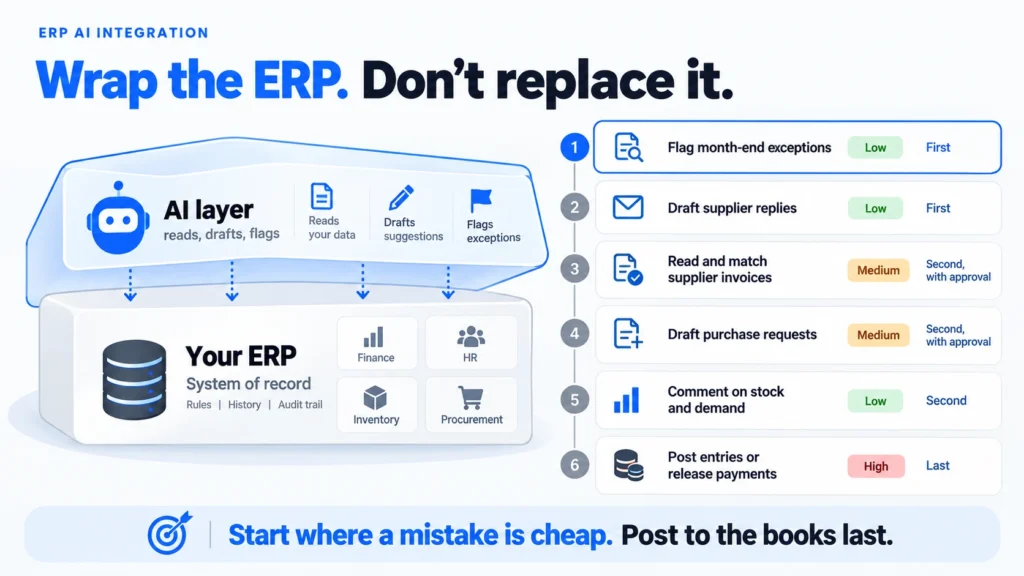
- ERP AI integration works best as a layer around your ERP, not a replacement. The ERP keeps your rules, history and audit trail, and the AI reads, drafts and flags on top of it.
- Start with low-risk jobs such as reading supplier invoices, flagging month-end exceptions and drafting replies to suppliers. Leave anything that posts to the ledger or releases payment until the earlier jobs have a track record.
- Most failures come from bad master data, duplicate postings, an AI account with too many permissions and no record of what the AI changed. Each is cheap to prevent before launch.
- UAE e-invoicing starts on 1 January 2027 for businesses at AED 50 million revenue or more, and 1 July 2027 for the rest, so the invoice side of the ERP should follow your provider’s setup.
What is ERP AI integration, and what is it not?
ERP AI integration is the work of connecting an AI tool to your ERP so that it can read records, draft documents and flag problems. Your ERP still holds the official data. It is not a new ERP, and it is not a chat window bolted onto your screens.
There are three ways businesses get AI into an ERP, and they can be combined:
- The vendor’s own AI features: the ERP supplier adds assistants or automation inside the product. This is the easiest start, and it is limited to what the supplier builds.
- A connected AI tool: a separate tool reads the ERP through its connector or exports. This gives more choice and needs more care over access.
- A custom build: software written to join your ERP, your documents and the AI around your own process. It costs more and suits unusual processes.
Think of the ERP as the ledger and the AI as a quick assistant who prepares the entries and asks for a signature before anything is written. ERP AI integration keeps that signature step in place.
Whichever route you choose, the ERP does not move. Your chart of accounts, approval rules and audit trail stay where they are. The AI becomes a new kind of user with its own account and limits.
This separates ERP AI integration from the older idea of replacing the system. Latent Digital Solutions starts from the work your team does in the ERP each day. It adds help where a task is repetitive and easy to check.
Does ERP AI integration mean replacing your ERP?
For most mid-size businesses, AI should sit around the ERP. Your ERP holds years of rules, history and approvals that took time to build. Replacing it to get AI is slow and risky, and the AI can usually reach what it needs through the system you already have.
Readiness is the real question. In a January 2025 survey by Rootstock, a cloud ERP supplier, 56% of manufacturers said they were unsure whether their ERP was ready for AI. That figure comes from a vendor survey of manufacturers, not UAE businesses generally. Even so, it matches what we see: owners are less worried about the AI than about whether the ERP can supply clean, reachable data.
In practice, ERP AI integration succeeds or fails on three points: whether the ERP can share its data, whether that data is tidy, and whether someone owns each task. A supplier’s brochure will not answer those questions, but a one-hour review of your own ERP usually does. Ask who keeps the supplier list, who approves purchase orders and where the month-end checks live. Those answers show where the AI can help and who must approve its work. Write them down in one page, with a name beside each task. The page becomes the brief for any supplier, and it stops the project from drifting toward whatever tool was demonstrated last.
Replacement makes sense in a narrower set of cases:
- The ERP is no longer supported by its supplier.
- It has no connector, export or API that anything can use.
- Its records are so unreliable that no tool could use them.
If any of these describes your ERP, the problem is the ERP itself. Our guide to ERP implementation explains what a new system takes, so you can compare the cost of replacing it with the cost of wrapping it.
Replacing an ERP is also a cost that is easy to underestimate. Data migration, retraining and a period of running two systems often take longer than the AI project you wanted in the first place. That is why most owners should test ERP AI integration on the system they have before they consider changing it.
If none applies, wrap the ERP you have. Pick one narrow job, connect the AI in a read-only way first, and let the results show you whether to go further.
Which jobs come first in ERP AI integration?
In ERP AI integration, start with jobs that are repetitive, text-heavy and easy for a person to check. Good examples are reading supplier invoices, flagging month-end exceptions and drafting supplier replies. Leave jobs that post to the ledger or release payment until the earlier ones have a record.
| ERP job | Risk | Order |
|---|---|---|
| Flag month-end exceptions | Low | First |
| Draft replies to supplier queries | Low | First |
| Read and match supplier invoices | Medium | Second, with approval |
| Draft purchase requests | Medium | Second, with approval |
| Comment on demand and stock trends | Low | Second |
| Post entries or release payments | High | Last, narrow cases only |
Month-end exceptions are a good opening job. The AI reads the day’s records, spots a duplicate invoice or an odd amount, and a person decides. Nothing changes in the ERP until that person acts.
Invoice matching comes next. The AI reads a supplier invoice, finds the matching purchase order and delivery note, and proposes the match. An accounts clerk approves it. The saving comes from the hunting and retyping. The clerk keeps the judgement.
Supplier queries are another safe start. A buyer spends part of each day answering the same questions about delivery dates, prices and payment status. The AI can draft an answer from the purchase order and the delivery record, and the buyer reads it before sending. The same pattern works for customer account queries in the sales ledger. In each case, ERP AI integration saves typing and searching and leaves the decision with a person.
The last row is where a mistake costs money immediately. Allow it only after weeks of evidence, and begin with one rules-based case, such as a recurring supplier with a fixed price. If you want to test the idea cheaply first, our guide to an AI proof of concept explains how to size a trial.
How does ERP AI integration connect to the system?
ERP AI integration connects to the ERP in four ways: the supplier’s built-in features, an official connector or API, a middleware tool that links several systems, or scheduled exports. Choose the route after you pick the job, and set up a separate AI login that can see only the records the job needs.
The routes differ in effort and control:
| Route | Effort | Watch for |
|---|---|---|
| Vendor’s built-in AI | Low | Limited to what the vendor offers |
| Official connector or API | Medium | Plan limits and extra fees |
| Middleware platform | Medium to high | Another tool to maintain |
| Scheduled export | Low | Only as current as the last export |
Pick the route by asking three questions. Does your ERP supplier already offer the feature you need? Does the supplier publish an API that your team or a partner can use? Do you need to combine the ERP with other systems, such as a CRM or a shared drive? A yes to the first question usually means starting there, because supplier-built features are supported and updated with the product. A yes to the second or third means a connected tool, with ERP AI integration built around it.
Most mid-size businesses use a mix. The built-in features handle simple jobs, an API handles the main flow, and an export feeds reports.
Whatever the route, apply the same ladder of trust. Let the AI read first. Then let it suggest, with a person approving each item. Only then let it act on a narrow task. This ladder matters more for an ERP than for most systems, because the ERP holds your money and your stock.
Keep a log of what the AI read and what it proposed or changed. When someone asks why an entry exists, the log answers the question in a minute instead of a week. Our guide to AI integration services shows what a fair scope looks like if you are comparing suppliers for this work.
What goes wrong in ERP AI integration?
Five problems account for most ERP AI integration failures. They are bad master data, duplicate postings, an AI account with too many permissions, no record of what the AI changed, and software updates that alter fields without warning. All five are cheaper to prevent before launch.
- Bad master data: duplicate suppliers, inconsistent item codes and missing fields give the AI several versions of the truth. It will answer confidently from all of them. Clean the fields the job uses first.
- Duplicate postings: if a draft is approved twice, or an integration retries after a timeout, the ERP can record the same item twice. Build checks that reject repeats.
- Too many permissions: an AI account with administrator rights can see salaries and change anything. Give it the narrowest account that does the job.
- No audit trail: without a record of what the AI proposed and who approved it, you cannot answer an auditor. Log both.
- Silent updates: an upgrade can rename a field or alter how dates are stored. Ask your supplier how changes are announced, and rerun a small test set after each one.
A sixth cause sits outside the system. Staff stop trusting a tool that gets its first week wrong. Start with the job where good drafts are easy to produce, and let the team mark each draft as useful or not. Their feedback is the fastest way to improve the instructions.
Run the first connection against a test copy of the ERP if your supplier provides one. A test copy shows how the AI behaves with realistic data, and it protects live records while you learn.
Plan for the ERP’s own work too. If a major upgrade is due, connect the AI after it, not before. Otherwise you build a connection that the upgrade immediately breaks.
That thinking shapes our work on adding AI to the ERP you already own. We start with the job and the data, and pick the connection last.
When can AI touch the invoice side of the ERP?
Under UAE e-invoicing, invoices travel between businesses in a fixed electronic format through accredited providers. AI that creates or posts invoices should follow your provider’s setup. Reading and checking the invoices you already hold is safe to start now.
According to EY’s summary of the Ministry of Finance decisions, businesses with revenue of AED 50 million or more must comply by 1 January 2027. Those below that comply by 1 July 2027. A pilot begins on 1 July 2026. Check your provider appointment dates directly with your adviser, because they have been adjusted since the original decisions.
For ERP AI integration, that gives a clear order. Use ERP AI integration now for reading, matching and flagging. Treat invoice creation as the last job, and let it follow the format your ERP supplier and provider agree. Ask your supplier in writing when its e-invoicing update will arrive, because a new format can change the fields an AI connection relies on.
What should a first ERP AI integration look like?
A sensible first ERP AI integration covers one read-only job and runs beside your team for a few weeks. It ends with a count of how often the AI was right. It proves value without letting the AI change anything.
- Pick the job and the number for ERP AI integration: for example, the hours spent each week matching supplier invoices to delivery notes.
- Choose the people: one accountable owner and a small group of users.
- Restrict the account: read access to the invoices and delivery notes only.
- Collect 30 real cases: include clean ones and awkward ones, with the right match written down.
- Compare: count correct matches, wrong matches and cases the AI refused.
Illustrative example (not a client case): an Abu Dhabi food importer receives about 200 supplier invoices a month. A clerk matches each one to a delivery note by hand. In the importer’s first ERP AI integration trial, the AI proposes a match for each invoice and the clerk confirms or corrects it. After three weeks the importer knows the share of matches that were right, and which suppliers cause the mismatches. If the numbers are good, the next step is letting the AI draft the posting for approval.
Keep the trial honest by recording the corrections. They are the most useful output, because they show where your data and rules need work. Fix those first, then widen.
Conclusion
ERP AI integration is about doing small, checkable jobs well before touching anything that posts to the books. Wrap the ERP you have, start with reading and flagging, add drafts with approval, and keep payment and posting for last. Clean the master data, restrict the AI account and log what it does. For anything involving invoices, follow the timetable your e-invoicing provider sets.
Over the next month, pick one job, find its owner and test it read-only on 30 real cases. The results tell you whether ERP AI integration is ready to go further in your business and what to fix first.
If you would like a second opinion on which ERP job should come first, talk to Latent’s team before you commit to a tool.
Frequently Asked Questions
Can AI replace ERP software?
Not in the near term for most businesses. ERP AI integration works best as a layer on top, because your ERP holds your rules, history and audit trail. The AI reads, drafts and flags. Replace the ERP only if it is unsupported or has no way to share data.
How can AI be used in ERP?
Common uses of ERP AI integration are reading supplier invoices and matching them to orders. Others are flagging month-end exceptions, drafting supplier replies and commenting on stock and demand. Each is a job a person can check quickly.
Is ERP AI integration safe for financial data?
It can be, with a restricted AI account, a person approving anything that posts, and a log of what the AI read and proposed. Ask where the provider keeps your data and whether it feeds their model training.
How long does ERP AI integration take?
A read-only ERP AI integration trial on one job can run within a few weeks once the owner and test cases are agreed. Connections that write to the ERP take longer since each one needs testing, sign-off and regular review.
Which AI is best for ERP?
There is no single best. The right choice depends on your ERP, the job and your data. Test two or three tools on 30 real cases from your own ERP and compare accuracy, cost and how each one fails.
Usually a reply within one working day.