Article Overview
If you’ve started evaluating ERP software, you’ve probably noticed every vendor makes ERP implementation sound routine. It isn’t. It’s a multi-month, cross-departmental change project. The software decision behind most operational headaches is usually made before anyone has scoped what implementation will actually cost.
- ERP implementation typically takes 4 to 8 months, and over half of projects run over budget.
- The single biggest predictor of failure isn’t the software. It’s under-investing in training and change management.
- Not every business that considers an ERP actually needs the full platform. A narrower system built around your two or three worst processes is often the better fit.
- Scoping the decision correctly, before evaluating vendors, is what actually determines whether the project earns its budget back.
What does ERP implementation actually involve?
ERP implementation is the process of installing, configuring, and rolling out a company-wide software platform. That platform typically handles finance, inventory, HR, and other core operations in one system. It isn’t a single event. It’s a project with several distinct phases, and each one carries its own risk.
Our guide to finance AI tools explains which finance tasks suit AI first and what to ask before you buy.
Our guide to ERP AI integration covers which ERP jobs suit AI first and what tends to go wrong.
Most guides describe this process as routine. That’s usually because most guides are written by the vendors selling the ERP. That framing skips the part that actually determines whether the project works: how much of the platform’s built-in breadth your business will genuinely use.
A business that only needs inventory and invoicing gains nothing from the HR and procurement modules bundled into the same ERP implementation. It still pays for that complexity, in training time, in configuration, and in the risk of something breaking at go-live.
Why do ERP implementations run over budget?
Budget overruns are common, and training is usually why. An industry study cited by ERP Focus found that 35% of ERP projects exceeded budget by up to 25%. Another 15% exceeded it by 26 to 50%, and 6% went over by more than half. Over half of all ERP projects run over budget in some form. Rough figures for a custom build are in our custom software cost breakdown for Dubai.
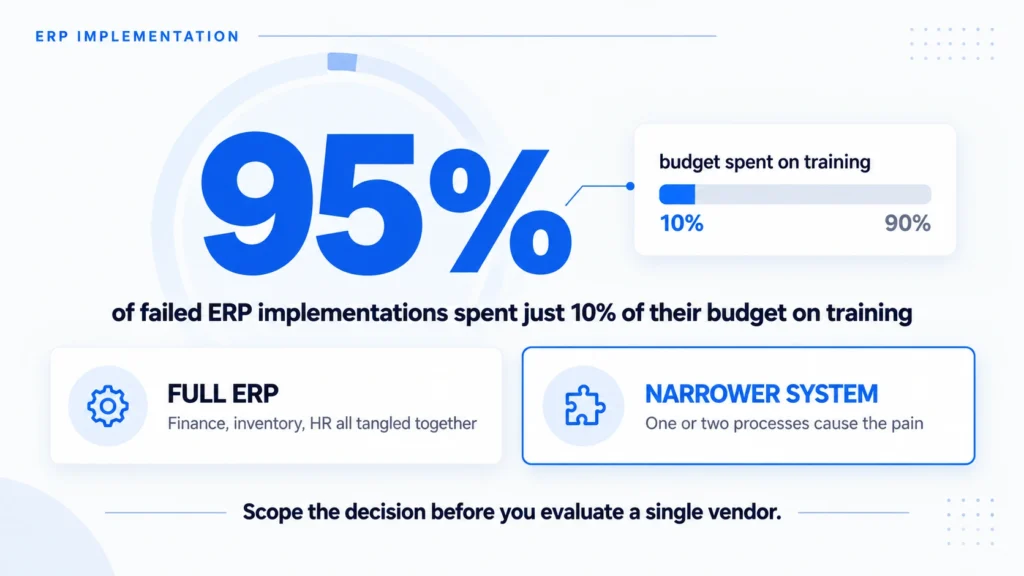
The same source reports a sharper finding. 95% of companies whose ERP implementation fails only dedicate 10% of their budget to user training and change management. The software usually works fine on its own. The people using it often haven’t been given the time to learn it properly before go-live.
That single number changes how you should plan. A training budget that looks generous on paper is frequently still not enough. It’s also the first place to check if a project is starting to slip.
Do you need a full ERP, or a narrower system?
Not always, and this is the question every vendor conversation skips. A full ERP makes sense when your finance, inventory, procurement, and HR processes are genuinely tangled together. One connected system then removes real duplicate work across all of them.
A narrower system makes more sense when only one or two processes are actually causing pain. Inventory tracking and invoicing is a common example, while the rest of the business runs fine on what it already has. Implementing the full platform in that case buys you modules nobody asked for. It also buys the training time and go-live risk that come with them.
There’s a middle case too, worth naming honestly: a business that genuinely doesn’t know yet which category it falls into. That’s more common than either extreme, and the fix isn’t to guess. It’s to map the actual pain points first, before a single vendor demo happens. If you go custom, the next decision is who builds it; see in-house vs. outsourced software development in the UAE.
In practice, that mapping exercise is short. Sit down with whoever owns finance, inventory, and operations. Ask them one question: where does the same piece of information get typed into a second or third system by hand? Two or three genuine answers is normal. A dozen answers usually means something different. The business has outgrown its current tools broadly enough that a full ERP implementation is the more honest starting point, not the narrower system.
Here’s a quick way to sort that out:
| Situation | Better fit |
|---|---|
| Finance, inventory, and HR are all tangled together | Full ERP |
| One or two processes cause most of the pain | A narrower, purpose-built system |
| You’re not sure yet | Map the actual pain points before evaluating vendors |
Building around the two or three processes that actually hurt, instead of adopting a platform sized for a much larger operation, is often the lower-risk path for a mid-size business. It’s the same scoping question that comes up in how we approach a project like this, just applied to a different starting point.
What are the real phases of implementation?
Every ERP implementation moves through the same rough sequence, even when vendors label the steps differently.
- A project team gets assembled, usually pulling people from finance, operations, and IT away from their regular work.
- A change management plan gets built, covering who gets trained and when.
- The budget gets set. This is where the training-versus-software split from earlier matters most.
- Data gets migrated from old systems into the new one. This step is almost always harder than a vendor’s timeline suggests.
- Users get trained on the actual system, not a generic walkthrough.
- The system goes live.
- Someone evaluates whether it actually worked.
Skipping or rushing any of these steps is the pattern behind most failures. Training is the one most often cut when a timeline slips, and it’s the step the data above ties directly to failure.
How long should you expect it to take?
Plan for 4 to 8 months. Treat anything shorter as optimistic, unless your business is genuinely small and your data is already clean. Complexity drives the timeline more than company size alone. More departments, more legacy data to migrate, and more custom workflows all add months. If the real problem is an old system rather than a missing one, see legacy system modernization in Dubai.
A realistic timeline also protects the training budget. Projects that get compressed to hit an arbitrary launch date are the ones most likely to cut training. That’s the exact work the data above ties directly to failure. The same discipline behind a written AI adoption framework, deciding upfront who signs off on scope changes, applies just as well to an ERP timeline.
Conclusion
ERP implementation isn’t difficult because the software is complicated. It’s difficult because it’s a change project wearing a software project’s name. Most of the risk sits in training, not configuration. Before you evaluate a single vendor, work out whether your business needs the full platform or a narrower system built around what actually hurts. That decision, made early, is what determines whether the project earns its budget back.
None of this means ERP software is a bad choice. It means the choice deserves the same scrutiny as the budget and the timeline, made before a vendor is in the room to shape the answer. A rushed ERP implementation rarely fails on day one. It fails quietly, months later, when the training gap finally shows up in how much manual double-checking the new system actually requires.
If you want help scoping which one fits your business, get in touch and we’ll work through it together.
Frequently Asked Questions
How long does ERP implementation take?
Most ERP implementation projects take 4 to 8 months. The exact timeline depends on how many departments are involved, how much data needs migrating, and how many custom workflows the business needs built in.
Why do ERP implementations fail?
The most common cause isn’t the software. It’s under-investing in user training and change management. One industry study found that 95% of failed implementations spent only 10% of their budget on training.
How much does ERP implementation cost?
Costs vary widely by company size and scope, but budget overruns are common. Over half of ERP projects exceed their original budget, often because training and change management were underfunded from the start.
What’s the difference between ERP and custom software?
An ERP is a pre-built platform covering many business functions at once. Custom software is built around the specific processes causing pain, without the cost and complexity of modules a business doesn’t need.
Do small businesses need a full ERP?
Not always. If only one or two processes are causing real pain, a narrower, purpose-built system usually solves it just as well. It also costs less, takes less training time, and carries less go-live risk than a full ERP.
Usually a reply within one working day.