Article Overview
An artificial intelligence assistant is software that understands plain language and helps with a task. It might draft an email, summarise a meeting or find a clause in a contract. Some are built into tools your team already uses. Others are separate apps, and a few can be trained on your own documents. This guide explains which kind suits which job, where each one falls short, and how to introduce one without risking company data.
Conversational AI services from Latent begin with the same step: pick the job first, then choose the assistant.
Already know you need an AI assistant?
Skip ahead to our conversational AI services for UAE businesses.
- An artificial intelligence assistant is not one product. There are five types, from voice assistants to custom assistants trained on your own documents, and each suits different jobs.
- Assistants save the most time on drafting, summarising and searching. A person should check anything that goes to a customer, a regulator or a bank.
- Company data stays safer with assistants that respect file permissions, plus a short written rule on what staff may paste in.
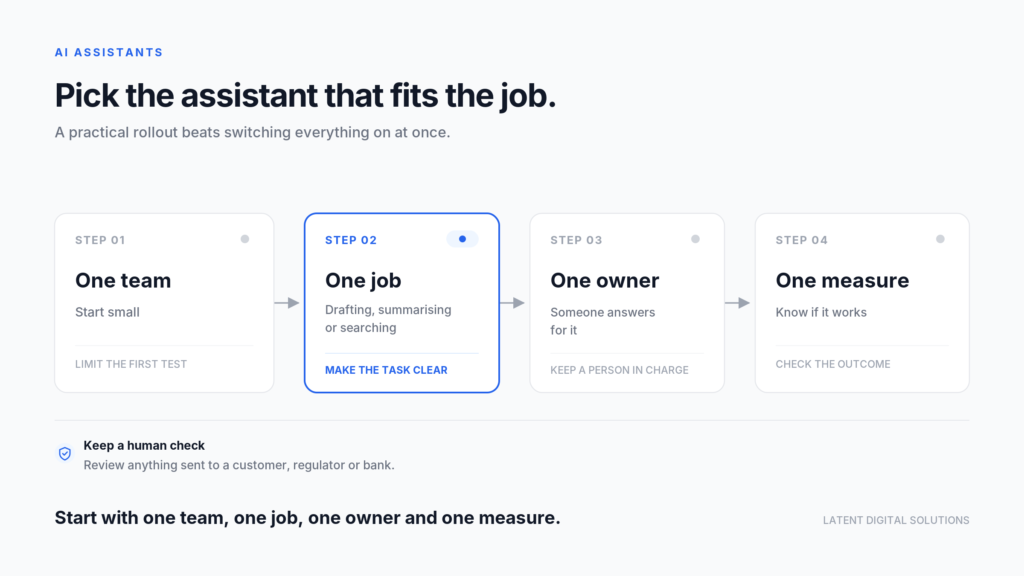
- A four-step rollout (one team, one job, one owner, one measure) works better than switching the whole company on at once.
What is an artificial intelligence assistant?
An artificial intelligence assistant is software that takes instructions in everyday language, text or voice, and carries out or supports a task. It reads what you ask, uses a language model to work out what you mean, and returns a draft, an answer or an action. You do not need to learn a special command language.
Three words are often confused, so it helps to separate them:
- Chatbot: a program that holds a conversation, often from a fixed script or a narrow set of answers.
- Artificial intelligence assistant: a tool that helps a person do work, usually by drafting, finding or summarising, with the person in charge.
- AI agent: a tool that takes several steps on its own across different systems, such as checking a calendar, booking a slot and sending a confirmation.
The line between them is blurring, and vendors use the words loosely. For an artificial intelligence assistant, the label matters less than the behaviour. For a business owner the useful question is not what it is called but how much it does without a person checking. An assistant suggests. An agent acts. That difference decides how much oversight you need.
Latent Digital Solutions starts from the business job, not the product name. Latent Digital Solutions asks which task costs your team the most time and which type of assistant fits it. A tool that suits a sales team’s email may be wrong for an accounts team’s invoices, so choose the artificial intelligence assistant for the job and not the other way round.
What types of artificial intelligence assistant exist?
There are five main types of artificial intelligence assistant. They are voice assistants, general chat assistants, assistants built into business software, custom assistants trained on your own documents, and autonomous agents. They differ in what they can reach, how much they do alone and how much risk they carry.
| Type | What it does | Typical business use |
|---|---|---|
| Voice assistant | Acts on spoken commands | Calendar, reminders, hands-free tasks |
| General chat assistant | Writes, summarises, answers questions | Drafting, research, first versions |
| Assistant inside business software | Works within your email, documents or CRM | Meeting notes, reply drafts, summaries |
| Custom assistant on your documents | Answers from your own policies and files | Staff questions, customer FAQs |
| Autonomous agent | Completes multi-step tasks across tools | Bookings, record updates, routine admin |
Most businesses start with the second or third type of artificial intelligence assistant, because they need no setup. A general chat assistant works in a browser. An assistant inside your existing software already knows your files and respects who can see them.
The fourth type needs more work but gives the most useful answers. A custom assistant reads your own documents, such as HR policies, product sheets or contract templates, and answers questions from them. Staff stop asking colleagues the same question, and the answer matches your actual rules instead of general knowledge.
The fifth type carries the most risk, because it acts. Treat autonomous agents as a later step, once you have one or two ordinary assistants working well and a person reviewing what they do. If your assistant will live inside a phone app, our mobile app development service covers that build.
What can an artificial intelligence assistant do?
An artificial intelligence assistant can draft, summarise, search, translate and answer questions faster than a person working alone. For a UAE business that mix is useful because so much work happens in two languages, across many channels, with a lot of documents. The saving shows up as time per task, not as a headline figure.
Common jobs include:
- Drafting: first versions of emails, proposals, tender responses and job descriptions, in English or Arabic, for a person to edit.
- Summarising: meeting notes, long email chains, contracts and reports, so a manager can read the key points in two minutes.
- Searching internal files: finding the right policy, quote or past project from a large shared drive.
- Customer replies: suggesting an answer to a WhatsApp or email enquiry, which a team member approves and sends.
- Data questions: answering a plain-language question about a spreadsheet, such as which customers have not ordered since March.
- Scheduling and admin: proposing meeting times and reminders.
The public sector is already moving in this direction. In September 2026, Dubai Police introduced an AI assistant for shift management. The announcement says it will be made available to government entities across the Emirate. The announcement gives no performance figures, so treat it as a sign of direction, not proof of results.
The pattern behind these examples is the one to copy when you add an artificial intelligence assistant. The assistant does a defined piece of work, such as building a shift plan, and a person remains responsible for the outcome. That is also why a tailored setup beats a generic one: the assistant needs to know your rules, your language and your files.
Want an outside view on which tasks would suit an artificial intelligence assistant? A conversational AI partner can list the candidates and score them against cost and risk with you.
What can an artificial intelligence assistant not do?
An artificial intelligence assistant cannot guarantee facts, cannot take responsibility and cannot know what it has not been given. It produces fluent text that can be wrong. A person must check anything that matters before it reaches a customer, a regulator, a bank or a court.
The limits worth knowing are these:
- Accuracy: assistants can state wrong facts in a confident tone. Microsoft’s own documentation, quoted again in the data section below, says responses are not guaranteed to be fully factual and that users should review the output before sharing it.
- Context: an assistant knows only what is in the prompt and the documents it can reach. It does not know the call you took yesterday.
- Responsibility: if an assistant drafts a wrong quote and you send it, the error is yours.
- Judgement: it can list options, but a decision about a supplier, a hire or a price remains a human one.
- Arabic quality: support for Arabic varies between tools and between formal and spoken styles. Test with your own documents before you rely on it.
These limits do not make an artificial intelligence assistant useless. They set the working rule. Use the assistant for the first draft or the first search, and keep a person responsible for the final version. Time saved on drafting is real, but only if checking is part of the process for every artificial intelligence assistant you use.
How do you keep company data safe with an AI assistant?
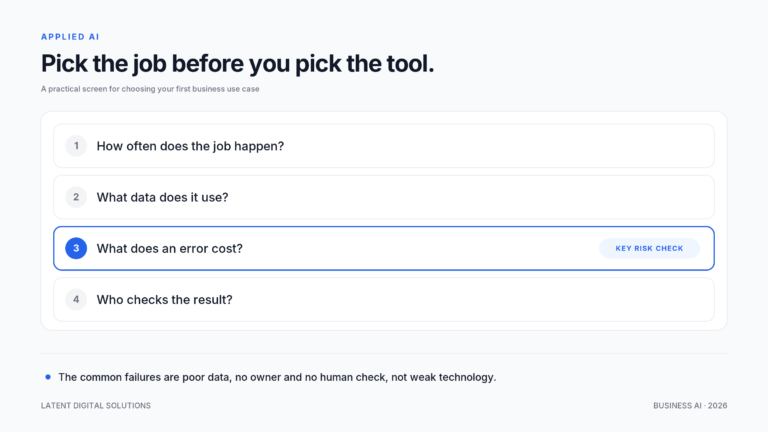
Choose assistants that respect existing permissions and check the vendor’s data terms. Then give staff a short written rule on what they may paste in. Most data problems come from staff using free tools with confidential material, not from the technology itself.
Start with the vendor’s commitments. For one widely used business assistant, Microsoft states that prompts, responses and data accessed through its Graph service are not used to train its foundation models. It also says the assistant only shows organisational data the user can already view. Two lessons follow. First, ask every vendor the same questions about training and permissions. Second, your own file permissions matter. An assistant that can see everything a user can see will expose any mistake in who has access to what.
A short rule for staff is usually enough:
- No customer personal data in free tools: use only the assistant your company has approved for that kind of data.
- No contracts, financials or passwords in an assistant that your company has not approved.
- Check before sending: anything an assistant drafts for an outside party is read by a person first.
- Report mistakes: if an assistant produces something wrong or odd, tell the owner so the rule can improve.
For the wider picture, our guide to enterprise AI security covers the controls larger organisations put around assistants and agents. Data protection law and sector rules may also limit what staff can share. Free zones such as DIFC and ADGM have their own regimes. Check with your legal adviser which tools are approved for personal data.
Shadow use is the quieter risk. Staff who find a useful free assistant will use it whether or not you have approved it. A better response than a ban is an approved list. Name the assistants staff may use, say what each is for and give them a quick way to ask for a new one. People follow a clear list far more often than a vague warning.
Also review file permissions before you switch on any assistant inside your email or shared drive. If a folder of salary files is open to everyone, an assistant can surface it to anyone who asks. Spend an afternoon checking who can open what, and close the gaps first.
How do you roll out an AI assistant?
You can roll out an artificial intelligence assistant in four steps: pick one team, pick one job, name one owner and set one measure. Starting small keeps the risk low and gives you evidence before you spend more. A company-wide switch-on usually produces uneven use and no clear result.
- Pick one team and one job: choose a task that is frequent and low risk, such as summarising meetings or drafting first replies.
- Name one owner: one person is responsible for the pilot, answers staff questions and reports results.
- Set one measure: record the baseline first, such as minutes per task or time to first reply. Compare after four to six weeks.
- Review and widen: keep the job that worked, drop the one that did not, then add a second team.
People are the hard part of any artificial intelligence assistant rollout. Staff who feel the assistant is a threat or a chore will not use it. Show them the first hour saved on their own work, and make clear that they remain responsible for the result. Our guide to AI tools for change management covers how to bring a team with you when you have no change specialist.
At the four-week review, ask three questions. Did the measure move? Did the team keep using it after the first week? What did it get wrong? The answers tell you whether to widen the pilot, change the job or stop. A pilot that ends with a clear no is still a good result, because it cost a few licences and not a company-wide rollout.
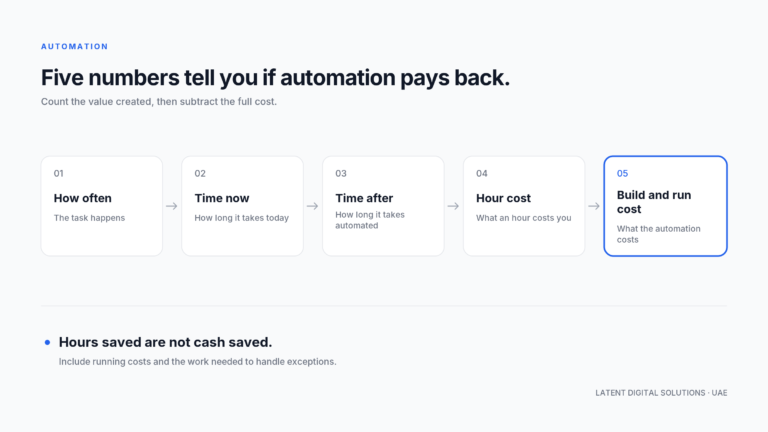
Costs are modest at the start. Many assistants are priced per user per month, so a pilot with ten people can be run and stopped without a large commitment. Record the licence fees and the time your owner spends, so the later business case uses real figures.
When do you need a custom AI assistant?
You need a custom artificial intelligence assistant when people keep asking questions that your own documents answer. A general tool cannot see those documents. A custom assistant reads your policies, price lists, contracts or manuals and replies from them, so the answer matches your rules.
Good candidates are internal help desks for HR and IT questions, customer-facing FAQs for a product or service, and sales support that finds the right specification quickly. A custom build costs more than a licence, takes longer and needs someone to keep the documents current. If the answers change often, an out-of-date document set will produce confident wrong answers.
Illustrative example (not a client case): a Sharjah property management firm gets the same tenant questions every week about maintenance requests, payment dates and contract terms. A custom assistant reads its tenancy templates and service policies and drafts answers for the support team to approve. The team’s replies become faster and more consistent, and new staff learn the rules from the answers.
Weigh it the way you would any build-or-buy decision. A general tool is faster and cheaper to try. A custom assistant is worth it when the knowledge is specific to your business. The question volume should be high, and a wrong answer should be cheap to catch. Our guide to build vs buy AI sets out the trade-offs. Whichever you choose, the discipline from the earlier section still applies: one job, one owner and one measure.
A custom artificial intelligence assistant needs three things to start. It needs a set of current documents in one place, a short list of questions it should answer and a person who checks the first fifty answers. Without the list, the project drifts. Without the check, errors reach users.
Plan for upkeep from day one. Someone must own the document set, remove old versions and add new policies. Review the questions the assistant failed to answer each month, because that list shows which documents are missing or out of date. A custom assistant that nobody maintains slowly becomes less accurate than a general one. Count that upkeep time as part of the cost when you compare a custom build with a licence. It is the cost most often left out of the sum, and it decides whether the assistant stays useful in the second year.
Conclusion
An artificial intelligence assistant is a helper, not a decision-maker. The right type depends on the job. Use a general chat assistant for drafting and one inside your software for meeting notes and replies. Use a custom assistant for questions your documents can answer. Add an agent only once you can supervise it. Keep a person responsible for the final result, give staff a short data rule, and start with one team and one measure.
In the next 30 days you can list the assistants your staff already use. You can check who can open which files. You can also choose one job for a four-week pilot. That is enough to turn a vague interest in an artificial intelligence assistant into a decision backed by your own numbers.
If you want help choosing the first job and the right type of assistant for your business, talk to Latent’s team.
Frequently Asked Questions
What can an artificial intelligence assistant do?
An artificial intelligence assistant can draft emails and proposals, summarise meetings and documents, search internal files, suggest customer replies and answer questions about data. It works best on repeated tasks where a person reviews the result.
What is the difference between an AI assistant and a chatbot?
A chatbot usually follows a script or a narrow set of answers. An AI assistant uses a language model to help a person with open-ended work such as drafting or summarising. The person stays in charge of the result.
Is ChatGPT an artificial intelligence assistant?
Yes. A general chat tool such as ChatGPT is a general-purpose artificial intelligence assistant. Business use needs extra care about what data staff enter and which version of the tool the company has approved.
Are AI assistants safe for company data?
They can be, if you choose tools whose data terms are clear, keep file permissions tidy and give staff a written rule on what to paste in. Free consumer tools are the main risk when used with confidential material.
Do AI assistants work in Arabic?
Many support Arabic, but quality varies between tools and between formal and spoken styles. Test any assistant on your own Arabic and English documents before you roll it out.
How much does an artificial intelligence assistant cost?
General and built-in assistants are often priced per user per month, which makes a small pilot affordable. A custom assistant costs more because it needs setup and upkeep. Get the full cost, including your own team’s time, before deciding.
Usually a reply within one working day.