Article Overview
An artificial intelligence app can mean three different things to a business owner. It can be a ready-made app your staff use, an AI feature added to software you already run, or a new app you build yourself. The right choice depends on the job, the data involved and how many people need it. Most UAE businesses should start with the first, move to the second when a process proves worth it, and build only when nothing else fits.
Mobile app development from Latent starts by asking which of the three your business actually needs.
Already know you need an app?
Skip ahead to our mobile app development services for UAE businesses.
- “Artificial intelligence app” covers three options: use a ready-made app, add AI to software you already own, or build a new app. Each has a different cost and risk.
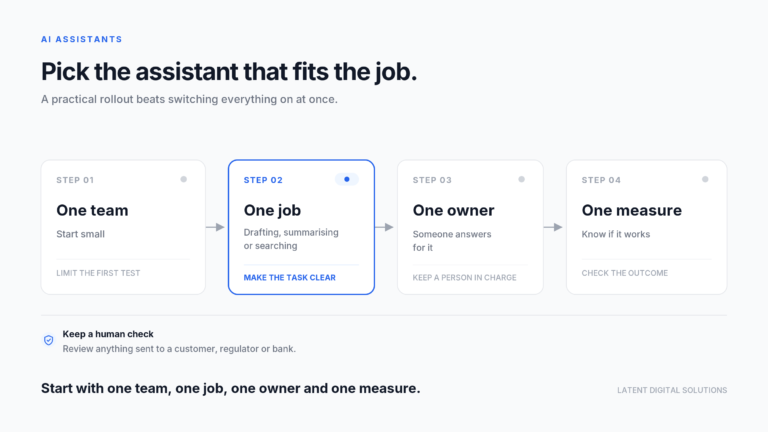
- Staff use AI apps whether or not you approve them, so the first job is a short approved list and a rule on what data may go in.
- Build your own artificial intelligence app only when the process is specific to your business, many people will use it and no existing tool fits.
- Building adds app-store duties: Apple asks you to disclose and get permission before sharing personal data with third-party AI, and Google Play requires in-app reporting.
What is an artificial intelligence app?
An artificial intelligence app is any app that uses AI to do a task for its user, such as writing, translating, answering questions, reading documents or recommending a next step. Some are standalone apps you download. Others are AI features inside software you already use. Both count, and both raise the same business questions.
The phrase hides a split that matters. A consumer artificial intelligence app is built for individuals, often free, with terms that suit a personal user. A business artificial intelligence app is built for companies, with admin controls, user accounts and clearer data terms. The two can look identical on a phone screen and behave very differently with your data.
Owners usually meet the topic in one of three ways:
- A staff member starts using a free AI app for work and mentions it casually.
- A manager asks whether the company should have its own app.
- A customer expects an AI feature in the app you already offer.
Each of these needs a different answer, and a different level of care. Latent Digital Solutions treats the question as a business decision first. The app is the method, and the saved time, fewer errors or better service is the outcome.
Which kind of artificial intelligence app do you need?
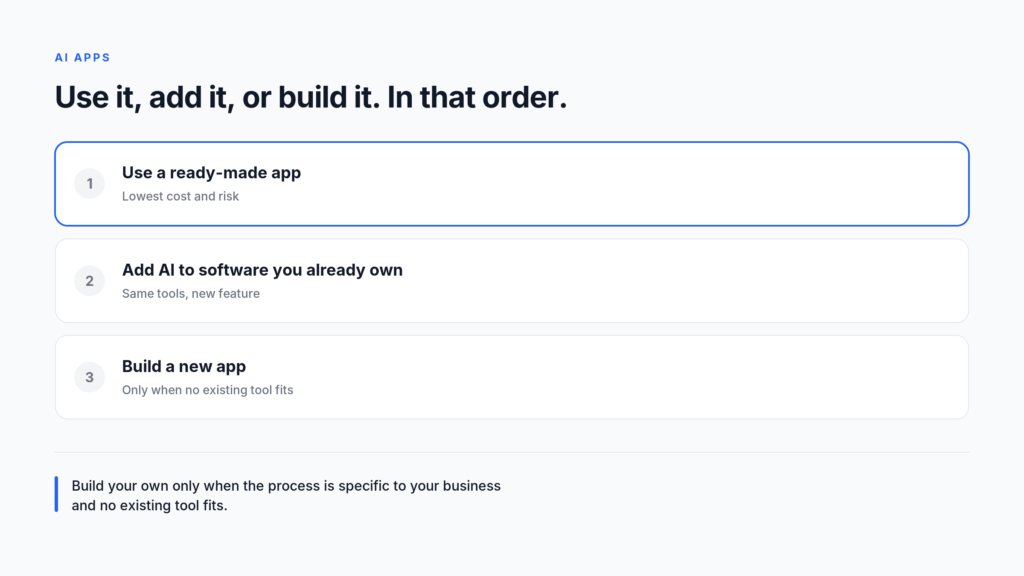
You need a ready-made artificial intelligence app when the task is common, an AI feature inside your current software when the task already lives there, and a new app only when the process is unusual and valuable. Work through the options in that order, because each step costs more.
| Option | When it fits | Main risk |
|---|---|---|
| Use a ready-made app | Common tasks: drafting, translating, summarising | Staff paste in data you did not approve |
| Add AI to software you own | The task already happens in your system | The feature is only as good as your data |
| Build a new app | A specific process many people will use | Cost, upkeep and app-store rules |
A simple test helps. If a vendor already sells the thing you want, buy or switch it on. If your own system holds the data and the task, ask the supplier about an AI feature or an integration. If neither is true, and the process is a real source of value, then consider a build.
Most businesses skip the first two and jump to the third, because a custom app feels more serious. That is usually the expensive mistake with an artificial intelligence app. A good ready-made tool tested on real work for a month teaches you more than a specification written in the abstract. Keep this order in mind when a supplier pitches a custom build. Ask them to show why a ready-made tool and an AI feature in your current software would not do the job. A good supplier answers that directly and may even talk themselves out of the build. A weak one skips the question.
For help choosing among the three, a mobile app development partner can look at your tasks and your data and say which route fits.
What can a ready-made artificial intelligence app do?
A ready-made artificial intelligence app can draft text, translate between Arabic and English, summarise documents, answer questions, transcribe meetings and pull key fields from forms. These are common tasks with plenty of good products. You can test most of them in days, with no build and a small monthly fee.
Typical business uses include:
- Writing and editing: first drafts of emails, quotes, job adverts and social posts that a person then edits.
- Translation: rough Arabic and English versions of customer messages, contracts and notices, checked by a fluent reader.
- Meeting notes: a transcript and a short summary with actions, so no one writes minutes by hand.
- Document reading: pulling dates, amounts and names out of invoices, IDs or trade licences.
- Research help: a quick first scan of a topic, with the facts checked before use.
Two limits apply to all of them. The first is accuracy: the output reads well even when it is wrong, so a person should check anything that matters. The second is data: what you type or upload may be stored or used in ways your company has not agreed to. That is why the free version of an app and the business version are not the same product.
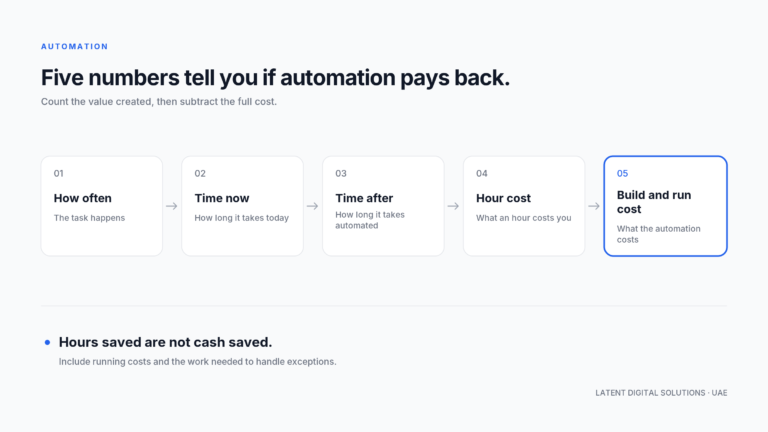
Most ready-made apps charge per user per month, with extra fees for heavy use. A fair trial is four weeks with five people on one task. Record the minutes per task before and after, then multiply by the hourly cost of the people involved. That gives you a saving you can compare with the fee, and it takes no technical skill.
If you are deciding whether to use a tool as it comes or build around it, our guide to build vs buy AI sets out how to weigh control against speed.
What should you check before staff use an AI app?
Before staff use any artificial intelligence app, check five things: who owns the account, what happens to the data, what the app can reach, what it costs and who approves new tools. A short answer to each is enough. The aim is to know what is in use and what may go in.
- Account type: use a company account with an admin, not personal logins. If a person leaves, you keep the work.
- Data terms: read what the vendor says about storing your inputs and using them to train its models. Prefer business plans that say they do not train on your data.
- Reach: note which files, mailboxes or systems the app can open. Fewer is safer.
- Cost: count the monthly fee per user and any extra usage charges.
- Approval: name one person who approves new apps and keeps the approved list.
Illustrative example (not a client case): a Dubai logistics firm finds that its dispatchers use a free AI app to rewrite customer emails. The emails contain names, phone numbers and shipment details. Nothing has gone wrong yet, but the firm cannot say where that data now sits. The fix is simple. It approves one business-plan tool, tells staff what they may paste in, and removes the free app from work phones.
Larger organisations add wider controls later, such as access logs and vendor reviews. The five checks above are enough to start. If the app is a web tool or an internal system rather than a phone app, our custom software development service covers the build.
When should you build your own AI app?
You should build your own artificial intelligence app only when the process is specific to your business, many people will use it and no existing tool fits. If any of those three is missing, a ready-made option or an AI feature in existing software will usually serve better and cost far less.
Good reasons to build include a customer-facing service that sets you apart, an internal tool wrapped around your own data and rules, or a product you plan to sell to others in your industry. Weak reasons include wanting to look modern, copying a competitor or assuming custom is always better.
If you build, plan for the rules of the app stores, because they now cover AI directly:
- Apple: its App Review Guidelines say you must clearly disclose where personal data will be shared with third parties, including third-party AI, and obtain explicit permission first.
- Google Play: an app with generative AI features must include in-app reporting or flagging so users can report offensive content without leaving the app.
These are design requirements, not paperwork. They shape your screens, your privacy notice and the contracts you sign with any AI provider.
Also be honest about upkeep. An AI app needs ongoing work: models change, prompts need tuning and data grows. Budget for the second and third year, not just the first build. Our guide to mobile app development cost in Dubai explains what projects of this kind actually cost to build.
How do you size the work before you commit?
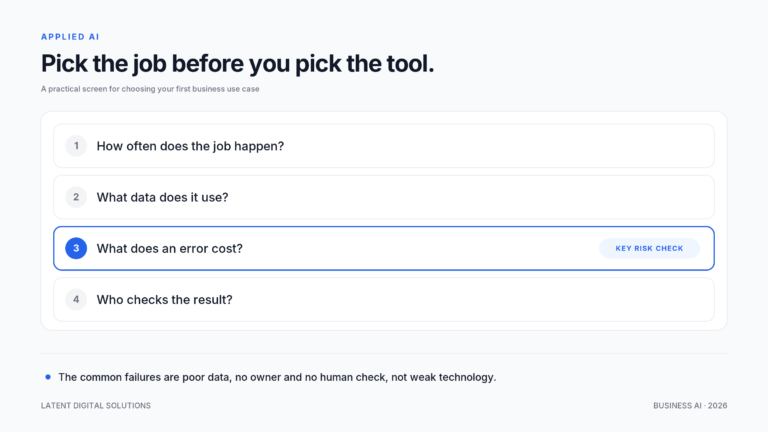
Size the work by writing down the one task the app will do, the people who will use it, the data it needs and the result you will measure. If you cannot fill in all four lines on one page, the idea is not ready to build. A prototype or a bought tool is the better next step.
A short list helps:
- Task: one sentence, such as “match supplier invoices to purchase orders”.
- Users: how many people, and on which devices.
- Data: where it lives, who owns it and how clean it is.
- Measure: the number that tells you it worked, such as minutes per invoice.
Add a budget ceiling to that page as well. Decide what you would be willing to spend before you speak to any supplier, and what saving or extra revenue would justify it. A ceiling set in advance protects you from a scope that grows to fill whatever figure you were first quoted. Also write down who will own the app after launch, because an app without an owner decays quickly.
Think about who will use the app and where. An internal tool for ten office staff can often be a web page, which avoids app-store review entirely. A customer-facing app usually needs to be in the stores, and then the Apple and Google rules above apply. Decide this early, because it changes both the cost and the timeline of the artificial intelligence app you are planning.
A simple prototype can answer these questions before you commit to anything large.
Platform is the next decision. A phone-first app needs a view on iOS and Android, and the order matters for cost and reach. Our guide to Android or iOS first covers how UAE businesses choose.
Put three questions to any supplier. How will our data be stored, and who can see it? What happens to the app if we change AI provider? What do you charge after the first year? Plain answers to these matter more than a polished demo.
Test the idea of an artificial intelligence app cheaply before you build. Run a ready-made tool on the same task for four weeks and record the result. If it works, you may not need an app at all. If it almost works, you now know exactly what a custom version would need to do better.
How do you decide in practice?
Decide in practice by asking three questions in order. Can a ready-made artificial intelligence app already do this? Does software we already own offer it? Is the process valuable and unusual enough to justify a build? Stop at the first yes.
Most businesses stop at the first or second when they weigh an artificial intelligence app. That is a good outcome, not a limit. It means the problem was ordinary and the cheapest answer worked. Write the answer to each question down with a date, so you can review the decision in six months, when the tools will have changed. The third is worth the effort only for processes that set you apart.
Conclusion
An artificial intelligence app is a means, not a goal. Start with a ready-made tool and a short approved list. Move to an AI feature in your own software when the task already lives there. Build only when the process is specific to you, many people will use it and nothing on the market fits, and plan for the app-store rules from the first sketch.
In the next 30 days you can list the AI apps your staff already use and name one person to approve new ones. You can also pick one task and run a four-week trial. That gives you real numbers before anyone writes a specification.
If you have a task in mind and want a straight view on whether to use, add or build, talk to Latent’s team.
Frequently Asked Questions
What is an artificial intelligence app?
An artificial intelligence app is an app that uses AI to do a task for its user, such as writing, translating, summarising or answering questions. It can be a standalone download or an AI feature inside software you already use.
What is the best artificial intelligence app for business?
There is no single best one. The right artificial intelligence app depends on the task, your data rules and your budget. Test one or two business-plan tools on a real task for four weeks and compare the results.
Are free AI apps safe for company data?
They carry more risk, because free terms often allow storing or using inputs in ways a business would not accept. Use a company account on a business plan, and tell staff what they may and may not paste in.
Can I add AI to an app I already have?
Often yes. Many software suppliers offer AI features or integrations. Ask your supplier first, because that is usually cheaper and faster than building. If you do add AI to your own app, plan for the app-store rules on personal data and user reporting.
Do I need to build my own artificial intelligence app?
Usually not. Build only when the process is specific to your business, many people will use it and no existing tool fits. Otherwise a ready-made app or an AI feature in existing software costs less.
How long does it take to test an artificial intelligence app?
A ready-made artificial intelligence app can be tested in days, and four weeks on a real task gives a fair result. A custom build takes much longer, which is why testing first is worth the time.
Usually a reply within one working day.