Article Overview
AI integration with existing systems means connecting an AI tool to the software you already run, such as your ERP, CRM and shared folders, so that it can read information and, later, act on it. The order matters more than the tool: connect read-only systems first, write-back second and finance last.
Giving an AI tool access to every system on day one is like handing a new employee every office key on their first morning. Our AI Transformation work treats the job as a sequencing problem. This guide sets out the sequence and the five places it usually goes wrong.
Already know which systems to connect?
Skip ahead to our AI transformation services for UAE businesses.
- AI integration with existing systems works best in three stages. Connect read-only systems first, allow write-back to your CRM or ERP second, and leave anything that posts to the accounts until last.
- A system is ready to connect when it has a usable export or API, a named data owner, reasonably clean records and permissions you can restrict. Without these, the first connection is slow and risky.
- Five things usually break in AI integration with existing systems: messy records, access limits, permissions that are too wide, silent changes by vendors and staff trust. Each has a cheap fix at the start and an expensive one after launch.
- UAE e-invoicing changes the order for finance. Businesses at AED 50 million revenue or more start in January 2027 and the rest in July 2027, so invoice connections should wait for your provider.
What does AI integration with existing systems mean?
AI integration with existing systems means letting an AI tool use the information in your current software, and sometimes change it, without replacing that software. Your ERP, CRM, helpdesk and shared drives stay in place. The AI becomes a new user of them, with its own limits.
Most businesses do not need a new platform. They need the old ones to talk to something that can read, summarise and draft. That can mean answering a question from a folder of contracts. It can mean drafting a reply from a ticket, or flagging an unusual invoice for a person to check.
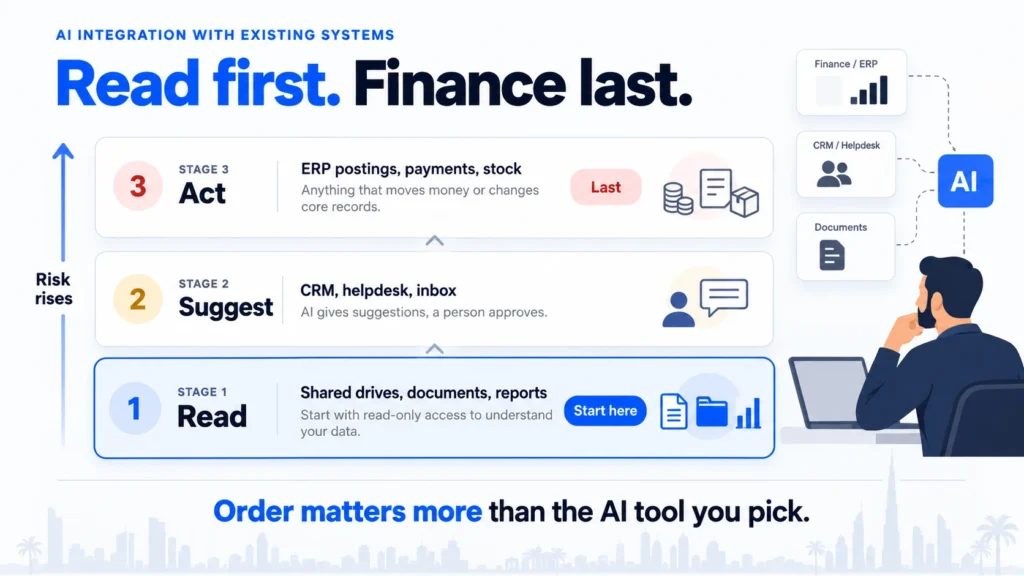
There are three levels of connection, and each carries more risk than the one before:
- Read: the AI looks at information and answers questions about it. Nothing in your system changes.
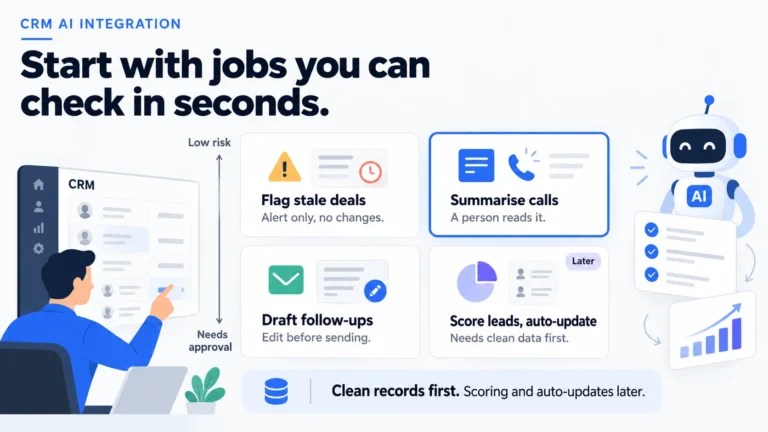
- Suggest: the AI drafts something, such as a reply, a note or a purchase order, and a person approves it.
- Act: the AI changes a record or triggers a step on its own, such as updating a status or posting an entry.
Think of it as the trust you would give a capable new hire. They start with read access, move to drafting under supervision, and only later get authority over money or customer records. Latent Digital Solutions applies the same ladder to every system we connect.
Which systems should you connect first?
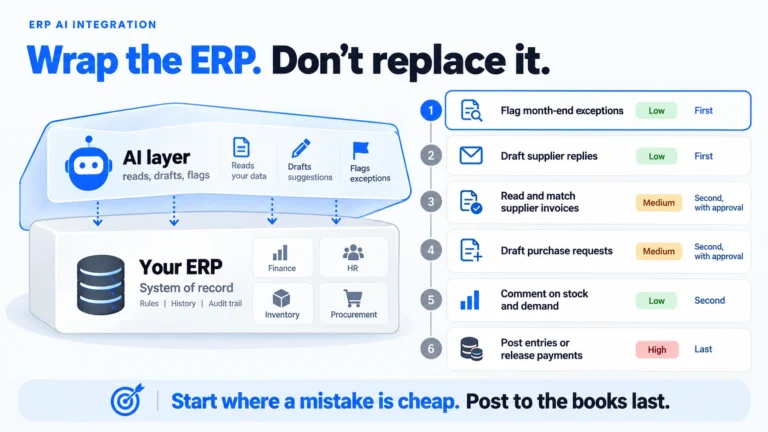
In AI integration with existing systems, connect read-only systems first, then systems where the AI can suggest changes for approval, and connect anything that moves money or stock last. This order keeps early mistakes cheap and gives you a track record before the risky connections.
| Stage | Typical systems | Rule |
|---|---|---|
| 1. Read | Shared drives, document stores, reports | AI can search and summarise only |
| 2. Suggest | CRM, helpdesk, inbox | AI drafts, a person approves |
| 3. Act | ERP postings, payments, stock | AI acts only on proven, narrow tasks |
Stage one is the safest place to learn. A folder of supplier contracts, a set of procedures or last year’s reports gives the AI plenty to work with. A wrong answer harms nobody, because a person reads it before acting. Teams typically find in this stage which of their documents are out of date or contradict one another.
Stage two adds value quickly, because a draft reply in the helpdesk or a suggested note on a CRM record saves time every day. Because a person approves each item, you can measure how often the draft was good and how often it needed changes.
Stage three is where the money sits, so it comes last and stays narrow. A good test for moving up a stage is simple: for four weeks running, the drafts need few changes and nobody has found a record that the AI should not have been able to see. Letting an AI post an entry or approve a refund should follow weeks of evidence from the earlier stages. Begin with one small, rules-based task.
Keep a one-line note of each stage decision, with the date and who agreed it. If someone later asks why the AI can post to a ledger, the note answers the question. If you are also choosing who should do the connecting, our guide to AI integration services explains how to compare suppliers and what a fair scope looks like.
How do you know a system is ready to connect?
A system is ready when you can answer four questions. Can its data be reached by a connector or export? Who owns that data? How clean are the key records? Can you limit what the AI sees? If any answer is unclear, fix that before you connect anything. Treat this as the entry test for any AI integration with existing systems.
- Can the data be reached? Check for an official connector, an application programming interface (API) or at least a scheduled export. If the only way in is copying screens, expect a fragile connection.
- Who owns the data? Name one person who can say what a field means and who may see it. Without an owner, nobody can approve access.
- How clean is it? Look at duplicates, blanks and inconsistent names in the fields the AI will use. Open fifty records and count the problems.
- Can you limit access? Confirm you can give the AI a restricted account that sees only what the task needs.
The owner question matters more than it sounds. When nobody owns a field, nobody can approve the AI reading it, and every access request turns into a debate. A named owner for each system can settle in one email what a committee takes a month to decide.
Suppose a distributor samples fifty CRM records and finds a dozen duplicates and several with no contact details. A drafting tool built on those records would write replies to half-empty profiles. Fixing the duplicates first costs a few hours, while finding the cause after launch means reviewing weeks of drafts. The cleanliness check surprises many owners. A CRM with three entries for the same customer gives the AI three versions of the truth. It will answer with confidence about all of them. Our guide to data readiness for AI lists the five questions to settle before any project starts.
Check the readiness questions separately for each system, because one tool can pass all four while the next fails two. A marketing platform with a clean export is a different case from an old finance tool with no connector. Write the answers down in one page per system, because that page becomes the brief for whoever builds the connection. It also shows which system should go first: the one with a reachable data source, a named owner and tidy records.
What breaks when AI meets the systems you run?
Five things usually break in AI integration with existing systems: messy records, access limits, permissions that are too wide, silent changes by vendors, and staff trust. None is exotic. Each one is cheap to deal with before launch and expensive to untangle afterwards, which is why the readiness checks come first.
IBM’s January 2026 guide to AI integration lists poor data quality first among its integration challenges. The same page cites an IBM Institute for Business Value study in which 72% of CEOs say that proprietary data is key to unlocking the value of generative AI. If your data is the asset, its condition decides the result.
- Messy records: duplicates and gaps produce confident wrong answers. Clean the fields the AI uses before connecting.
- Access limits: some software plans cap how often outside tools can call them, or charge extra for API use. Check this before you promise a date.
- Permissions too wide: a connection that sees everything can reveal salary data or client terms to the wrong person. Give it a restricted account.
- Silent changes: a software update can rename a field or change a format overnight. Ask suppliers how they announce changes, and keep a small test set you can rerun.
- Staff trust: if the first drafts are poor, people stop using the tool. Start with a task where good drafts are easy to produce.
Plan for the last one in particular. A connection can work perfectly and still fail if the team that should benefit decides in week two that it cannot be trusted. Involve the people who do the work, show them early results and let them mark drafts as good or bad.
Keep a simple log of failures in the first month. Each entry needs the date, what the AI did, what should have happened and which of the five causes it was. After a few weeks the log tells you where to spend effort.
Which way should AI connect to each system?
Use the official connector or API where one exists, and use an integration platform when you need to join several systems. Choose screen automation only when nothing else is available. Pick the method for AI integration with existing systems after you have chosen the system and the stage, not before.
| Method | Good for | Watch for |
|---|---|---|
| Official connector or API | Most modern ERP, CRM and helpdesk tools | Plan limits and extra fees |
| Integration platform | Joining three or more systems | Another tool to pay for and maintain |
| Screen automation | Old software with no API | Breaks when a screen changes |
| Scheduled export | Reports and reference data | Data is only as fresh as the export |
Most mid-size businesses end up with a mix. The knowledge base connects through an export, the CRM through its official connector, and one old finance tool through a more careful workaround.
Whichever method you use, keep the connection narrow. Give it access to the fields and records the task needs, and log what it reads and changes so a person can review it later. That is what separates a connection from simply opening the doors.
This is the approach behind our work on connecting AI to the systems you already run. We start with the stage and the data, and choose the method last.
How does UAE e-invoicing change the order?
UAE e-invoicing means invoices must be exchanged electronically through an accredited provider, so any AI that touches invoices should wait until your provider’s format is settled. Reading and analysing the invoices you already hold can start now. Creating or posting new ones should not.
According to KPMG’s summary of the Ministry of Finance decisions, a pilot begins on 1 July 2026. Businesses with revenue of AED 50,000,000 or more start on 1 January 2027, and smaller businesses start on 1 July 2027. In May 2026 the ministry moved the deadline for larger businesses to appoint a provider from 31 July to 30 October 2026, and the January go-live did not change.
For AI integration with existing systems, that gives a practical rule. Treat the invoice process as stage three, and let it follow your provider’s setup rather than lead it. In the meantime, a read-only tool that spots duplicate invoices or late payments is safe and useful.
Check what your ERP supplier plans for the new format. A software update that changes how invoices are created can also change the fields an AI connection depends on. Ask for the release notes in writing, and plan any ERP change as its own small project.
What does a sensible first integration look like?
A sensible first AI integration with existing systems is read-only, covers one set of documents, runs for two weeks with a few users and ends with a count of useful answers. It teaches you how your data behaves without putting any record at risk.
- Choose one document set: for example, supplier contracts or HR procedures.
- Name the owner and the users: one accountable person and three to five users.
- Restrict the account: read-only access to that set and nothing else.
- Collect 20 real questions: the ones staff ask most often, with the correct answer noted.
- Count the results: how many answers were correct, how many cited the right file, and how many were wrong.
Illustrative example (not a client case): a Sharjah trading company keeps supplier contracts in a shared drive, and the finance team often asks which contract allows a discount for early payment. The first integration lets the AI answer that question and point to the exact file. After two weeks the team knows how many answers were right. If the number is good, stage two follows: drafting reminders from the contract terms for a person to approve.
A small first result gives you a plan for the next one. The first stage shows how clean your documents are, and the second shows how much time the drafts save. By the third you have the evidence to decide whether the AI should act on its own.
Conclusion
AI integration with existing systems is a matter of order. Connect read-only systems first, allow suggestions with approval second, and leave actions that touch money until you have proof. Check readiness before each connection, plan for the five failure points, and let UAE e-invoicing set the pace for anything involving invoices.
In the next 30 days of your AI integration with existing systems, you can pick one document set, name its owner and run a read-only trial on 20 real questions. You will learn more about your own data in those weeks than from any vendor demo, and the answers tell you which system to connect next in your AI integration with existing systems.
Not sure which of your systems should come first? Talk to Latent’s team and we will help you put the work in order.
Frequently Asked Questions
How do you do AI integration with existing systems?
Start with systems the AI can only read, such as document stores and reports. Move to suggestions that a person approves, such as drafted replies. Allow the AI to act on records last, and only for narrow tasks that earlier stages have proved.
Do you need to replace your ERP or CRM to use AI?
Usually not. For AI integration with existing systems, most current ERP and CRM tools offer connectors or APIs that an AI tool can use. Replacement is worth considering only when the system has no way to share data or its records are too unreliable to use.
How long does AI integration with existing systems take?
A read-only first integration can run in a couple of weeks once the document set and owner are agreed. Connections that write to your CRM or ERP take longer, because they need testing, approvals and a review routine.
Is it safe to give AI access to company data?
It is safe when access is narrow and logged. Use a restricted account, limit the fields the AI can see and keep a record of what it reads and changes. Confirm in writing where the provider stores data and whether it is used for training.
What is the cheapest way to start?
For AI integration with existing systems, pick one set of documents, connect it read-only and test 20 real questions with a few users. That needs little build work and shows how reliable your data is before you spend on anything larger.
Usually a reply within one working day.