Article Overview
AI agents for business are software programs that complete tasks autonomously inside your existing systems, the same way an employee would, without needing to be supervised at each step. Most of what they handle in practice is repetitive admin: screening applicants, updating records, monitoring changes, processing documents. The part most coverage skips is that the newest generation does not need a modern API to do any of this — they can sign into whatever software you already run and drive it directly.
Whether your business gets real value from AI agents depends almost entirely on what your team’s repetitive work actually looks like, not on what a vendor says the technology is capable of.
Key takeaways
- 01.AI agents for business handle repetitive, rule-based tasks autonomously. They do not replace human judgement on decisions that genuinely require context.
- 02.The newest agents can sign into and drive software the way a person would, which means they work on older systems even without a modern API.
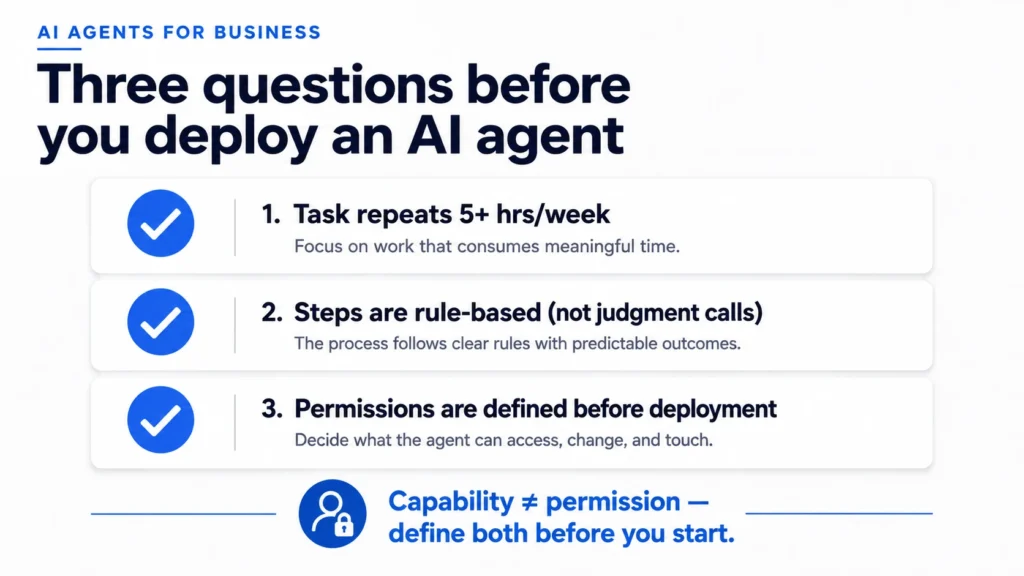
- 03.The business case comes from tasks that consume five or more hours per week, not from occasional ten-minute jobs that feel annoying.
- 04.Before giving any agent access to your systems, decide what it is and is not allowed to touch. Capability and permission are different things.
What are AI agents for business?
An AI agent for business is a program that takes a goal, works out the steps involved, and executes those steps inside the software your team already uses, without someone directing each action manually. The practical difference between an agent and a simpler automation, like a workflow trigger or a spreadsheet macro, is that an agent handles variation. It can read a job application, apply a set of criteria, and file it accordingly even when every application is worded differently. A macro handles identical inputs. An agent handles messier ones. For the fixed-workflow side, see digital automation for a UAE business.
For a plain-language comparison of the two terms, see our guide to AI agent vs agentic AI.
What agents do not do, despite how they tend to be described in product marketing, is exercise judgement on genuinely novel situations. They are reliable at tasks where the rules can be written down clearly, even if those rules are complex. They struggle at tasks where an experienced person makes calls that would be difficult to specify in advance. That boundary is the most useful thing to understand before evaluating any specific tool.
What do AI agents for business actually do?
In August 2026, xAI launched Grok Bots, describing them as “AI teammates that do real work for you. They sign in to your tools, use them just like you do, and come back with finished work.” Shortly after, entrepreneur Eric Zakariasson published a list of 100 use cases he had personally watched them handle. Almost none of it was glamorous. For what to check before using it in a UAE business, see What Is Grok Bot?
Riya, an operations coordinator at a recruitment firm in Dubai, heard about this and was sceptical. Her team spent six hours every Monday morning screening weekend applications across three job boards. She ran a single pilot: one agent, one open role, two weeks. The agent screened 847 applications in 40 minutes and returned a ranked shortlist with a one-line summary for each candidate. Riya’s Monday became a 15-minute review. The rest of her team stopped asking when the shortlist would be ready.
The list of documented use cases goes further: screening 1,000 event applicants against a profile and sorting them into categories. Reviewing 200 job applications and returning a strong, mid, or reject split. Watching a competitor’s pricing page and sending an alert when the price changes. Updating a CRM contact record from a name. Searching company chat history for who asked about a specific feature, in 15 seconds instead of an hour. Scraping receipts out of an inbox and cancelling subscriptions nobody is using.
This is what AI agents for business look like when they are working. The individual tasks are dull. The hours they replace are not. If your operations team spends two hours every Monday pulling information out of one system and entering it into another, that is several hundred hours a year of work an agent can handle instead. It rarely makes headlines, and it consistently makes a measurable difference to how people spend their time.
A useful way to sort your own candidates: the tasks worth automating fall into three groups. Work that crosses systems that do not talk to each other, which is the largest category in practice. Work that involves high-volume judgement against a clear rule, such as sorting, scoring, or triaging. And work that nobody owns, including the subscription nobody cancelled, the competitor page nobody is watching, and the report nobody is updating because the person who used to do it left.
Do AI agents for business require an API?
This is the question that decides whether any of the above applies to the systems your business actually runs. And the honest answer, for most businesses, is no longer yes.
There are two ways an agent can interact with software. The first is through an API: a clean, structured connection where the agent sends a request and the software responds in a predictable format. This is fast, reliable, and requires the software to have built a modern API layer. Most enterprise tools built in the last five years have one. Many older systems do not.
The second is UI automation: the agent signs in, navigates the interface, and completes the task the way a person would. xAI states explicitly that their agents are designed to work on platforms “lacking clean APIs or MCP support.” One observed use case was literally about working around a missing bulk-enrol permission in a sales tool by driving its interface directly.
For a business running on software from 2015, or on a system built by a local vendor without an API layer, this matters. The argument that “we cannot automate that because our software is old” is weaker than it was. An agent can log in and do the work. The limiting factor is no longer whether the software has an API; it is whether the task is clear enough for an agent to execute reliably.
There are still situations where the software itself is the problem. If a system is fragile, poorly documented, or genuinely holding the business back, automating around it is a workaround, not a fix. Legacy Modernization is built for that situation, and it changes what is possible with automation afterwards.
How to choose AI agents for your business
The question worth asking is not which agent is most powerful. It is which tasks in your business are repetitive enough, time-consuming enough, and clearly defined enough to be worth setting one up. Gartner defines AI agents as autonomous systems that perceive inputs and take actions to achieve goals — a useful frame because it immediately separates them from bots that simply follow fixed scripts.
A reasonable threshold: if a task recurs at least weekly, takes 30 minutes or more in total each time, and can be described as a set of steps a new employee could follow on their first day, it is worth evaluating seriously. Below that threshold, the overhead of setting up, monitoring, and occasionally correcting an agent often exceeds the time saved.
The tasks that consistently clear that threshold in practice are: document processing (applications, invoices, contracts, intake forms), CRM maintenance (updating records from emails, flagging stale accounts, enriching contact data), monitoring tasks (pricing changes, regulatory updates, competitor announcements), and first-pass triage on inbound requests where the routing logic is explicit.
The tasks that consistently disappoint are: anything where a senior person’s judgement is what makes the output useful, anything involving nuanced external conversations, and anything where the inputs vary so much that the error rate becomes the main cost. A useful first step, before choosing any tool, is to be honest about which category each candidate falls into. Building a clear picture of what your business is actually ready to automate is what an AI strategy for business leaders should settle first.
What to put in place before deploying agents
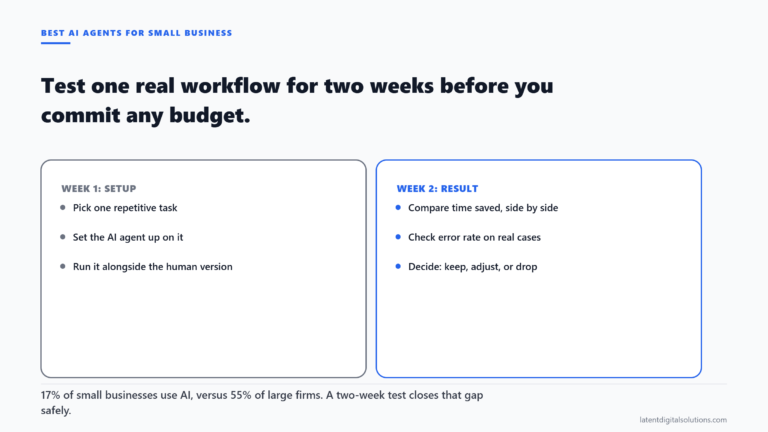
An AI agent with a login to your systems is, for practical purposes, an employee with a login to your systems. The same principles apply: limited access to start, verified output before expanding scope, and a named person responsible for checking its work. Smaller teams can start with our guide to testing an AI agent before you commit.
Deploying AI agents for business without governance in place is the single most common reason pilots get shut down. Three things worth doing before any agent goes live. First, define what it can and cannot touch in specific terms, not vague categories. “The CRM” is not specific enough. “The CRM contacts tab, with read access to existing records and write access to the status field only” is. Specificity is what makes the oversight manageable.
Second, decide which actions require human sign-off before they execute. Sending an email on behalf of the company, changing a customer’s account status, processing a financial document: actions with real consequences should have a human review step in place at the start, even if you remove it later once you trust the output.
Third, name who monitors it. An agent running without anyone checking its output is not a system; it is a risk. Someone needs to own the regular check that the agent is doing what it was set up to do and nothing else. This does not need to be a technical role. It needs to be a person who understands the underlying process well enough to notice when something looks wrong.
In the UAE, where in 2026 AI adoption among individuals reached 70.1%, well ahead of any other country according to the Microsoft AI Economy Institute, the gap between how many people use AI personally and how many businesses have structured it properly into their operations is significant. Individual tools and business deployment are different things, and the governance above is what separates them.
The bottom line
The best AI agents for business solve one problem that already costs your team measurable time — not a collection of aspirational use cases. AI agents for business are a practical category of tool with a clear use case: repetitive, rule-based work that currently consumes hours a week across your team. The newer generation removes the API requirement that previously made older software a barrier, which matters for businesses whose systems were not built with integration in mind.
What they are not is a replacement for human judgement on decisions that genuinely require context. The starting point is identifying the specific tasks in your business that meet the threshold, not evaluating which product to buy. If you want a second pair of eyes on which processes in your business are actually ready for this, talk to us. That conversation usually surfaces better candidates than the obvious ones, and rules out a few that initially look suitable but are not.
Our OpenAI consulting company page covers how we build agent-style workflows on OpenAI and Azure OpenAI.
Frequently Asked Questions
What is the difference between AI agents for business and regular automation tools?
Regular automation tools, such as workflow triggers or macros, handle identical, predictable inputs. AI agents for business can handle variation: they read context, apply rules, and complete tasks even when the input changes from instance to instance. The trade-off is that agents require more setup, monitoring, and governance than a simple trigger does.
Do AI agents for business require modern software with an API?
Not any more. The newer generation of AI agents can sign into software and drive it through the user interface, the same way a person would, without needing an API connection. This means they can work on older systems that were never built with integration in mind, though UI automation is slower and more fragile than a clean API connection when one is available.
What kinds of tasks are AI agents for business best suited for?
Tasks that recur frequently, follow a clear set of rules, and consume significant time. Document processing, CRM maintenance, monitoring for changes, and first-pass triage on inbound requests are the categories that most consistently deliver a measurable return. Tasks requiring genuine judgement or nuanced external communication are not good candidates.
How do you give AI agents access to business systems safely?
Define specifically what the agent can access and change, not broadly by system. Start with the minimum necessary permissions. Build a human review step for any action with real consequences. Assign a named person to check the agent’s output regularly. These steps are not optional extras; they are what keeps a useful tool from becoming a liability.
What is a realistic ROI timeline for AI agents in a small or mid-size business?
For tasks that consume five or more hours per week across the team, setup and monitoring costs typically pay back within one to three months if the process is well defined. For tasks below that threshold, or where the process requires significant cleanup before an agent can handle it reliably, the payback period extends considerably and the case weakens.
Sources
- xAI. “Introducing Grok Bot.” xAI News, August 2026. x.ai/news/introducing-grok-bot — retrieved 2026-08-27
- Microsoft AI Economy Institute, reported by The National. “UAE ranks first globally in AI adoption at 70.1%.” The National, 7 May 2026. thenationalnews.com — retrieved 2026-08-27
- Gartner. “What Is an AI Agent?” Gartner Articles. gartner.com — retrieved 2026-08-27
Usually a reply within one working day.