Article Overview
If two people on your team spend part of every week moving information between systems that are already digital, that’s not a technology problem. It’s a digital automation gap. The systems exist, but nothing connects them without a person in the middle. That’s the manual work that survives even after a business goes digital, and it’s more common than most owners assume once they look for it.
Already know you need this?
Skip ahead to our AI automation company in the UAE, part of our AI transformation services.
- Digital automation now covers two genuinely different tools: fixed workflows that follow the same steps every time, and AI agents that can handle judgment calls on messy input.
- Picking the wrong one for a given process is the most common reason automation projects stall or get abandoned.
- Most UAE businesses don’t need to automate everything at once. The highest-value starting point is usually the one process that already crosses two or three systems by hand.
- Getting the fit wrong costs more than the software: it costs the months spent building something nobody trusts enough to stop double-checking.
What is digital automation, exactly?
Digital automation is the use of digital tools to carry out a business process with little or no human involvement in the repeated steps. The Hackett Group defines it as technology that runs and executes business processes with minimal human intervention. That covers tools like robotic process automation, workflow engines, low-code platforms, and AI.
Our guide to WhatsApp automation AI explains how it works, what drives the cost and how to set it up.
Our guide to AI SEO tools explains which search jobs to give software and what Google says about AI-written pages.
Before you commit to any build, work out the automation ROI on your own numbers: volume, time saved, running cost and payback.
That last addition matters. Ten years ago, “automation” mostly meant one thing. It was a script or workflow tool that repeated the same fixed steps, in the same order, every time. That’s still useful. It’s still what most vendors sell when they say “digital automation.” But it only works when the process itself never changes.
A growing share of business work isn’t like that. It involves reading an invoice that doesn’t match the usual template. It means deciding whether to escalate a customer complaint, or matching up two spreadsheets that don’t quite agree. These tasks need a judgment call, not a fixed script. That’s the gap an AI agent is built to close.
Is this a workflow problem or a judgment problem?
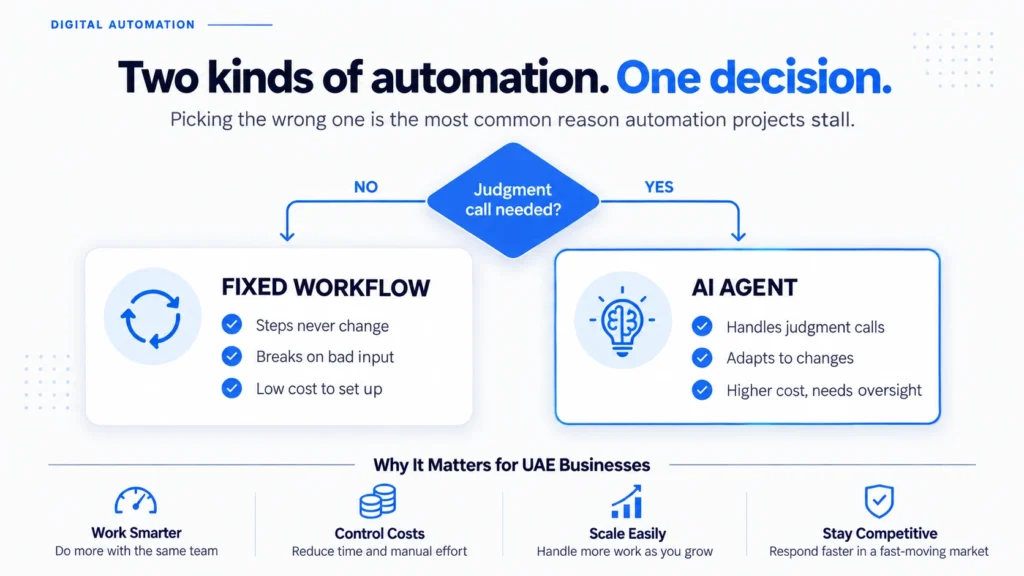
Before choosing a digital automation tool, ask one question. Does this process ever require a decision that isn’t written down anywhere? If the answer is no, a fixed workflow tool will do the job. It costs a fraction of the price of an AI-based system, and it’s far less complex.
A fixed workflow suits repetitive, unchanging work, such as:
- Copying a field from one system into another
- Sending a reminder email on a set schedule
- Generating a report from data that’s already clean
The steps stay the same, so a rule-based tool is the right fit. Building an AI agent for this is over-engineering. It costs more and adds risk the task doesn’t need.
Judgment-based work looks different. It means reading something that varies, like an email, a scanned document, or a customer message. It means weighing more than one factor, or handling an exception a fixed script would simply fail on. For automated customer conversations, see conversational AI on WhatsApp.
A logistics business chasing shipment delays is doing this kind of work. So is a retailer answering product questions that don’t match a script. A finance team matching up invoices that arrive in five different formats faces the same problem. That’s where older automation tools couldn’t help, and where AI agents now can.
| Fixed workflow | AI agent | |
|---|---|---|
| Best for | Steps that never change | Work that needs a judgment call |
| Breaks when | An input doesn’t match the format | Rarely, since it can work out what changed |
| Cost to set up | Low | Higher, and needs early oversight |
If the answer to “does this process ever need a judgment call” is yes, you’re looking at an AI-agent problem, not a fixed-workflow one.
What can AI-agent automation do that RPA can’t?
IBM draws the same line. Traditional RPA “perform[s] well on structured, repetitive tasks” because it has no real awareness of context. An agentic system can reason about a change and adapt to it, rather than breaking. That’s the theory.
The evidence is more practical. Grok Bot’s real-world automation use cases documents dozens of tasks that beta users had it complete across sales, operations, and finance. The same pattern runs through nearly all of them. Each task crossed more than one system, happened often enough to matter, and involved a small, cheap error if the agent got something wrong. Before giving any agent access to real systems, see our guide to Grok Bot’s access, cost and data risk.
This is the sharper edge of digital automation today. A rule-based workflow tool breaks the moment an input doesn’t match what it expects. An AI agent can read the input, work out what changed, and still complete the task. It isn’t following a fixed script; it’s reasoning about what’s in front of it. That’s the difference between automating a step and automating a decision.
This doesn’t make AI agents a universal upgrade over older automation. They cost more to set up properly, and they need a person checking their output until the business trusts them. They’re also a poor fit for anything high-stakes with no room for error, like a financial transaction that can’t be reversed. AI-agent automation adds a new category of work you can now automate. It doesn’t replace every fixed workflow that already works fine on its own.
Where do most UAE businesses actually start?
Almost never with the flashiest use case. In our experience, businesses that get real value from digital automation start with one process, not a company-wide rollout. That process almost always already causes visible friction. It might be an invoice approval chain that takes three days because someone is on leave. It might be a customer intake form that gets re-typed into three separate systems. Or it might be a stock count kept in a spreadsheet nobody fully trusts.
That’s also where legacy modernization questions tend to surface. A process built around a system from a decade ago is often the reason automation feels harder than it should. The data is there, but it’s locked inside software nobody wants to touch. If that describes part of your operation, modernizing the system underneath it is often the real first step. The automation layer on top comes second.
Starting small and specific also protects the budget. A single, well-chosen process shows whether automation actually saves the time it promises. Only then does it make sense to automate everything else around it.
What does it cost to get this wrong?
Digital automation done badly still costs money. The direct cost of choosing the wrong kind isn’t usually the software licence. It’s the months spent building a system that solves the wrong problem. That could be an AI agent bought to do work a simple workflow tool could have handled for less. Or it could be a rigid workflow tool forced onto a process that needed judgment. It now breaks every time an input looks slightly different.
The quieter cost is trust. If a team stops believing an automated process works correctly, they start double-checking it by hand. The business ends up paying twice: once for the automation, and again for the manual work it was supposed to remove. Getting it right the first time is what actually determines whether a digital automation project earns its budget back.
Want this scoped for your business?
Talk to our AI automation team about which of your processes to automate first.
Conclusion
Digital automation isn’t one thing anymore. Treating it as one thing is the most common reason a project underdelivers. Some of your business’s manual work is a fixed-steps problem, and a simple workflow tool can solve it today. Some of it is a judgment problem. It needs an AI agent that can handle a messy input and still get the task right. Working out which is which, before buying anything, is the decision that actually matters.
If you want to talk through which category your own manual processes fall into, get in touch and we’ll walk through it together.
Frequently Asked Questions
What is the difference between digital automation and digital transformation?
Digital automation is one part of digital transformation, focused on removing manual steps from a process. Digital transformation is the broader shift in how a business uses technology, and automating tasks is just one piece of it.
Is RPA the same as AI?
No. RPA (robotic process automation) follows a fixed set of steps and breaks when an input doesn’t match what it expects. AI agents can interpret a varied or messy input and still complete the task. That’s why they suit judgment-based work that RPA can’t handle.
What processes should a small or mid-size business automate first?
Start your digital automation effort with the process causing the most visible, recurring friction, not the most technically interesting one. A task that already crosses two or three systems by hand and happens often enough to matter is usually the strongest starting point.
Does digital automation replace jobs or just tasks?
In most of the real digital automation deployments we’ve seen, it removes specific repetitive tasks from a role rather than the role itself. That frees the person for work that actually needs judgment, relationships, or oversight.
How do you know if a process is ready to automate?
If the steps never change and the data going in is already clean and structured, it’s ready for a fixed workflow tool now. If it involves reading something variable, or making a judgment call, it needs an AI agent instead. Keep a person checking its output until it earns trust.
Usually a reply within one working day.